dplyr 应用
实战案例与技巧
Tidyverse 篇本章主要关注dplyr的一些应用。
导入数据
今天讲一个关于企鹅的数据故事。
library(tidyverse)
library(palmerpenguins)

penguins <- penguins %>% drop_na()
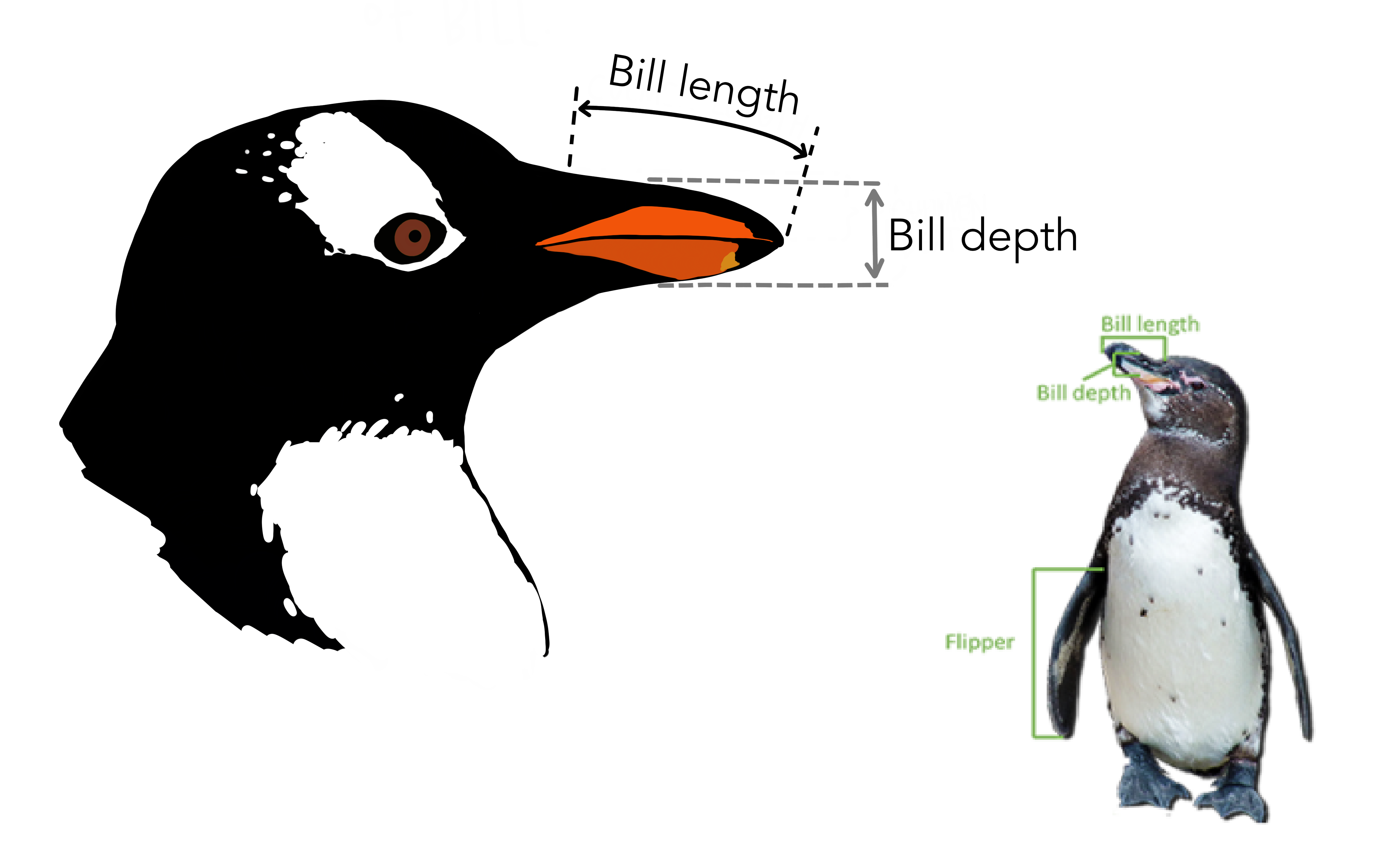
变量含义
| variable | class | description |
|---|---|---|
| species | character | 企鹅种类 (Adelie, Gentoo, Chinstrap) |
| island | character | 所在岛屿 (Biscoe, Dream, Torgersen) |
| bill_length_mm | double | 嘴峰长度 (单位毫米) |
| bill_depth_mm | double | 嘴峰深度 (单位毫米) |
| flipper_length_mm | integer | 鰭肢长度 (单位毫米) |
| body_mass_g | integer | 体重 (单位克) |
| sex | character | 性别 |
| year | integer | 记录年份 |
简单回顾
选择"bill_"开始的列
penguins %>% select(bill_length_mm, bill_depth_mm)penguins %>% select(starts_with("bill_"))选择"_mm"结尾的列
penguins %>% select(bill_length_mm, bill_depth_mm, flipper_length_mm)penguins %>% select(ends_with("_mm"))选择含有"length"的列
penguins %>% select(bill_length_mm, flipper_length_mm)penguins %>% select(contains("length"))选择数值型的列
penguins %>% select(where(is.numeric))选择字符串类型的列
penguins %>% select(where(is.character))选择字符串类型以外的列
penguins %>% select(!where(is.character))可以用多种组合来选择
penguins %>% select(species, starts_with("bill_"))返回向量还是数据框
对应数据框my_tibble, 注意返回向量还是数据框的区别
- 返回向量
my_tibble[["x"]]

my_tibble$x

my_tibble %>%
pull(x)- 返回数据框
my_tibble["x"]

my_tibble %>%
  select(x)
选择全部为0的列
tb <- tibble(
  x = c(1, 2, 3, 4, 5),
  y = 0,
  z = c(-1, -2, 0, 2, 1),
  w = c(0, 1, 2, 3, 4)
)
tb


myfun <- function(x) all(x == 0)
tb %>%
  select(where(myfun))


# or
tb %>%
  select(where(~all(.x == 0)))  # 找出选择全部为0的列

tb %>%
  select(where(~sum(.x) == 0))  # 找出这一列元素之和为0的列

tb %>%
select(where(~any(.x == 0))) # 找出这一列元素含有0的列课堂练习:剔除全部为NA的列或者全部为NA的行
df <- tibble(
  x = c(NA, NA, NA),
  y = c(2, 3, NA),
  z = c(NA, 5, NA)
)

# columns
df %>%
  select(where(~ !all(is.na(.x))))

# rows
df %>%
  filter(
    if_any(everything(), ~ !is.na(.x))
  )
寻找男企鹅
函数 filter() 中的逻辑运算符
| Operator | Meaning | |
|---|---|---|
== | Equal to | |
> | Greater than | |
< | Less than | |
>= | Greater than or equal to | |
<= | Less than or equal to | |
!= | Not equal to | |
%in% | in | |
is.na | is a missing value (NA) | |
!is.na | is not a missing value | |
& | and | |
| ` | ` | or |
penguins %>% filter(sex == "male")penguins %>% filter(species %in% c("Adelie", "Gentoo"))penguins %>%
filter(species == "Adelie" & bill_length_mm > 40)
penguins %>%
filter(species == "Adelie", bill_length_mm > 40)课堂练习,说出以下代码的含义
penguins %>%
  filter(species == "Adelie", bill_length_mm == max(bill_length_mm) )
更多应用
希望介绍一个技术,对应一个应用场景
弱水三千,只取一瓢
penguins %>%
  head()

penguins %>%
tail()penguins %>%
slice(1)penguins %>%
group_by(species) %>%
slice(1)嘴峰长度最大那一行
三种方法
penguins %>%
filter(bill_length_mm == max(bill_length_mm) )penguins %>%
arrange(desc(bill_length_mm)) %>%
slice(1)penguins %>%
slice_max(bill_length_mm)separate
tb <- tibble::tribble(
  ~day, ~price,
  1,   "30-45",
  2,   "40-95",
  3,   "89-65",
  4,   "45-63",
  5,   "52-42"
)tb1 <- tb %>%
separate(price, into = c("low", "high"), sep = "-")
tb1unite
tb1 %>%
  unite(col = "price", c(low, high), sep = ":", remove = FALSE)
distinct
distinct()处理的对象是data.frame;功能是筛选不重复的row;返回data.frame
df <- tibble::tribble(
  ~x, ~y, ~z,
  1, 1, 1,
  1, 1, 2,
  1, 1, 1,
  2, 1, 2,
  2, 2, 3,
  3, 3, 1
)
dfdf %>%
distinct()df %>%
distinct(x)
df %>%
distinct(x, y)df %>%
distinct(x, y, .keep_all = TRUE) # 只保留最先出现的rowdf %>%
distinct(
across(c(x, y)),
.keep_all = TRUE
)df %>%
group_by(x) %>%
distinct(y, .keep_all = TRUE)n_distinct()处理的对象是vector;功能是统计不同的元素有多少个;返回一个数值
c(1, 1, 1, 2, 2, 1, 3, 3) %>% n_distinct()df$z %>% n_distinct()df %>%
group_by(x) %>%
summarise(
n = n_distinct(z)
)有关NA的计算
NA很讨厌,凡是它参与的四则运算,结果都是NA,
sum(c(1, 2, NA, 4))所以需要事先把它删除,增加参数说明 na.rm = TRUE
sum(c(1, 2, NA, 4), na.rm = TRUE)mean(c(1, 2, NA, 4), na.rm = TRUE)寻找企鹅中的胖子
penguins %>%
  mutate(
    body = if_else(body_mass_g > 4200, "you are fat", "you are fine")
)随堂练习:用考试成绩的均值代替缺失值
df <- tibble::tribble(
    ~name,     ~type, ~score,
  "Alice", "english",    80,
  "Alice",    "math",    NA,
    "Bob", "english",    70,
    "Bob",    "math",    69,
  "Carol", "english",    NA,
  "Carol",    "math",    90
  )
dfdf %>%
group_by(type) %>%
mutate(mean_score = mean(score, na.rm = TRUE)) %>%
mutate(newscore = if_else(is.na(score), mean_score, score))给企鹅身材分类
penguins %>%
  mutate(
   body = case_when(
     body_mass_g < 3500                       ~ "best",
     body_mass_g >= 3500 & body_mass_g < 4500 ~ "good",
     body_mass_g >= 4500 & body_mass_g < 5500 ~ "general",
     TRUE                                     ~ "other"
  )
)随堂练习:按嘴峰长度分成A, B, C, D 4个等级
penguins %>%
  mutate(
    degree = case_when(
      bill_length_mm < 35                        ~ "A",
      bill_length_mm >= 35 & bill_length_mm < 45 ~ "B",
      bill_length_mm >= 45 & bill_length_mm < 55 ~ "C",
      TRUE                                       ~ "D"
  )
)
每种类型企鹅有多少只?
知识点:n()函数,统计当前分组数据框的行数
penguins %>%
  summarise(
    n = n()
)penguins %>%
group_by(species) %>%
summarise(
n = n()
)统计某个变量中各组出现的次数,可以使用count()函数
penguins %>% count(species)不同性别的企鹅各有多少
penguins %>% count(sex, sort = TRUE)可以统计不同组合出现的次数
penguins %>% count(island, species)可以在count()里构建新变量,并利用这个新变量完成统计。 比如,统计嘴巴长度大于40的企鹅个数
- 常规做法
penguins %>%
  filter(bill_length_mm > 40) %>%
  summarise(
    n = n()
)count()做法
penguins %>% count(longer_bill = bill_length_mm > 40)解析思路:bill_length_mm > 40 比较算符 返回逻辑型向量,向量里面只有TRUR和FALSE两种值,因此上面的代码相当于统计TRUE有多少个,FALSE有多少个?
强制转换
矢量中的元素必须是相同的类型,但如果不一样呢,会发生什么? 这个时候R会强制转换成相同的类型。这就涉及数据类型的转换层级
- character > numeric > logical
- double > integer
比如这里会强制转换成字符串类型
c("foo", 1, TRUE)这里会强制转换成数值型
c(1, TRUE, FALSE)c(TRUE, TRUE, FALSE) %>% sum()随堂练习:补全下面代码,求嘴峰长度大于40mm的占比?
penguins %>%
  mutate(is_bigger40 = bill_length_mm > 40)
across()之美
我们想知道,嘴巴长度和厚度的均值
penguins %>%
  summarize(
    length = mean(bill_length_mm)
  )
接着添加下个变量
penguins %>%
  summarize(
    length = mean(bill_length_mm),
    depth  = mean(bill_length_mm)
  )
长度和厚度惊人的相等。我是不是发现新大陆了?
across()函数
更安全、更简练的写法,王老师的最爱
penguins %>%
  summarize(
     across(c(bill_depth_mm, bill_length_mm), mean)
 )
翅膀的长度加进去看看
penguins %>%
  summarize(
     across(c(bill_depth_mm, bill_length_mm, flipper_length_mm), mean)
 )
还可以更简练喔
penguins %>%
  summarize(
    across(ends_with("_mm"), mean)
 )
::: {.rmdnote}
across()函数用法
across(.cols = everything(), .fns = NULL, ..., .names = NULL)- 用在
mutate()和summarise()函数里面 across()对多列执行相同的函数操作,返回数据框
:::
数据中心化
penguins %>%
  mutate(
    bill_length_mm = bill_length_mm - mean(bill_length_mm),
    bill_depth_mm  = bill_depth_mm  - mean(bill_depth_mm)
    )
更清晰的办法
centralized <- function(x) {
  x - mean(x)
}


penguins %>%
  mutate(
    across(c(bill_length_mm, bill_depth_mm), centralized)
  )
数据标准化
std <- function(x) {
  (x - mean(x, na.rm = TRUE)) / sd(x, na.rm = TRUE)
}


penguins %>%
  mutate(
    across(c(bill_length_mm, bill_depth_mm), std)
  )
或者使用更简洁的方法
# using across() and purrr style
penguins %>%
  summarise(
    across(starts_with("bill_"), ~ (.x - mean(.x)) / sd(.x))
  )
多列多个统计函数
penguins %>%
  group_by(species) %>%
  summarise(
    across(ends_with("_mm"), list(mean = mean, sd = sd), na.rm = TRUE)
)随堂练习:以sex分组,对"bill_"开头的列,求出每列的最大值和最小值
penguins %>%
  group_by(sex) %>%
  summarise(
    across(starts_with("bill_"), list(max = max, min = min), na.rm = TRUE)
)在相关章节到相关章节会继续讲王老师的最爱across()函数。