数据规整
tidyr 长宽格式转换
Tidyverse 篇
R
library(tidyverse)提问
假定这里有 A, B, C 和 D 四种植物每天生长的记录,
R
plant_height <- data.frame(
  Day = 1:5,
  A = c(0.7, 1.0, 1.5, 1.8, 2.2),
  B = c(0.5, 0.7, 0.9, 1.3, 1.8),
  C = c(0.3, 0.6, 1.0, 1.2, 2.2),
  D = c(0.4, 0.7, 1.2, 1.5, 3.2)
)


plant_height
{BLOCK TIDYR-3, TYPE="DANGER"}
大家想想,

- 把植物高度大于或等于0.8cm的时刻**筛选**出来,怎么写语句?
- 用不同的颜色画出四种植物**生长曲线**,怎么写语句?
很显然,我们用相关章节数据处理和相关章节数据可视化的技术,可以写成这样
R
plant_height %>%
  filter( ___ >= 0.8)
R
plant_height %>%
  ggplot(aes(x = Day, y = ___, color = ___)) +
  geom_line()
然而,发现遇到了问题?数据的格式与我们期望的不一样!
怎么解决呢?想用上面的语句,数据就得变形。那么怎么变形呢?
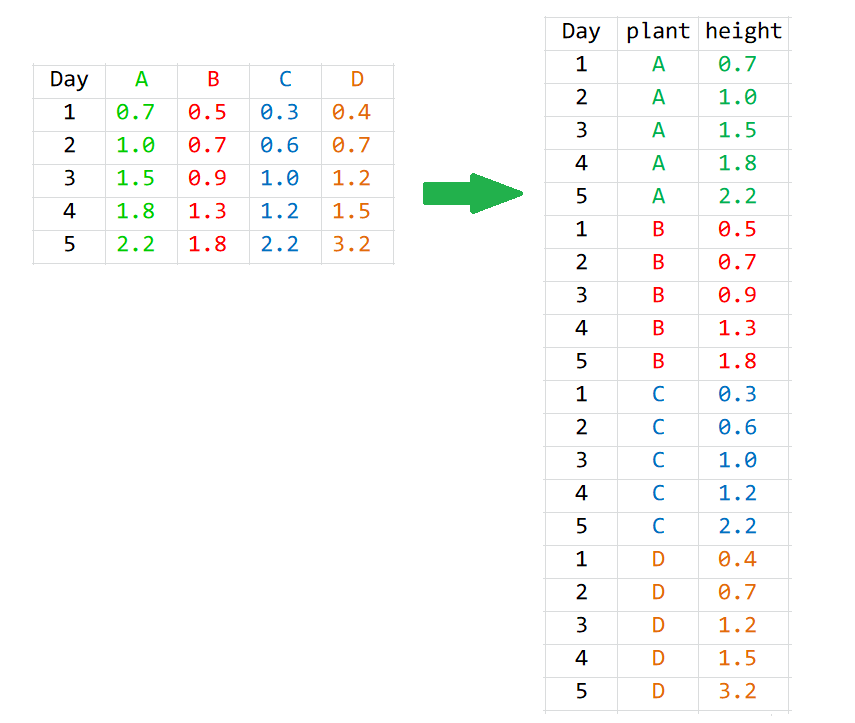
下面任意一种都行:
R
melted <- gather(plant_height, variable, value, 2:3)

## Column names instead of indices
melted <- gather(plant_height, variable, value, A, B)

## Excluding instead of including
melted <- gather(plant_height, variable, value, -1)

## Excluding using column name
melted <- gather(plant_height, variable, value, -Day)但我更推荐大家使用tidyr::pivot_longer(), 这是2019年9月份,tidyr 1.0.0新增的一组函数pivot_longer()/pivot_wider(),用来补充和完善原来的gather()/spread()
gather()/pivot_longer宽表格变成长表格spread()/pivot_wider长表格变成宽表格
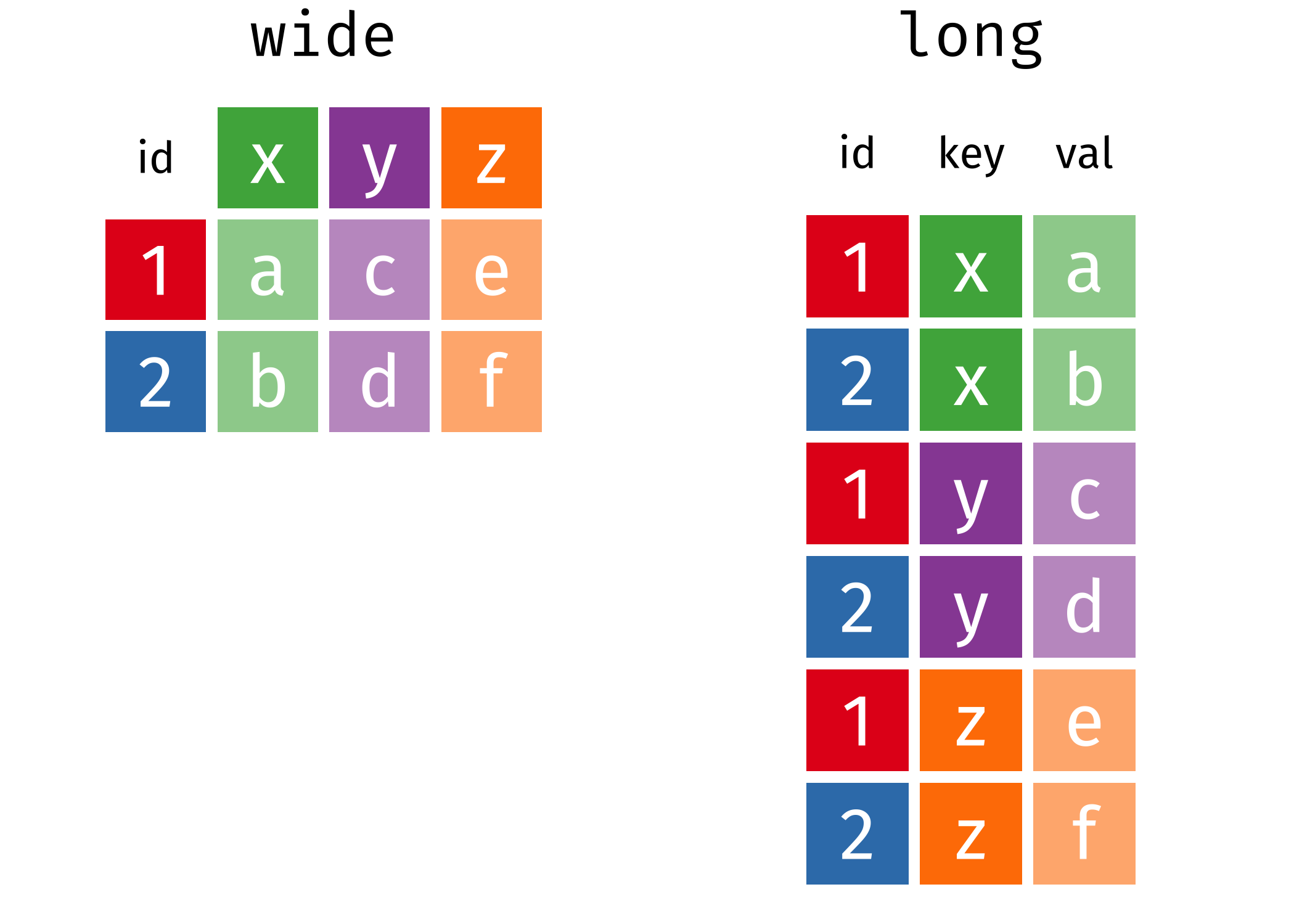
宽表格变成长表格
所以现在使用pivot_longer()函数
R
long <- plant_height %>%
  pivot_longer(
    cols = A:D,
    names_to = "plant",
    values_to = "height"
  )
long这里pivot_longer()函数有三个主要的参数:
- 参数
cols,表示哪些列需要转换. - 参数
names_to,表示cols选取的这些列的名字,构成了新的一列,这里需要取一个名字. - 参数
values_to, 表示cols选取的这些列的值,构成了新的一列,这里也需要取一个名字. - 数据框总的信息量不会丢失
当然,参数cols 的写法可以多种形式的,具体见相关章节select()函数.
R
plant_height %>%
  pivot_longer(
  cols = -Day,         # A:D or c(A, B, C, D) or c("A", "B", "C", "D")
  names_to = "plant",
  values_to = "height"
)
画图的问题也就解决了
R
long %>%
  ggplot(aes(x = Day, y = height, color = plant)) +
  geom_line()
长表格变成宽表格
如果,长表格变回宽表格呢?需要用到pivot_wider()
R
wide <- long %>%
  pivot_wider(
  names_from = "plant",
  values_from = "height"
)
wide
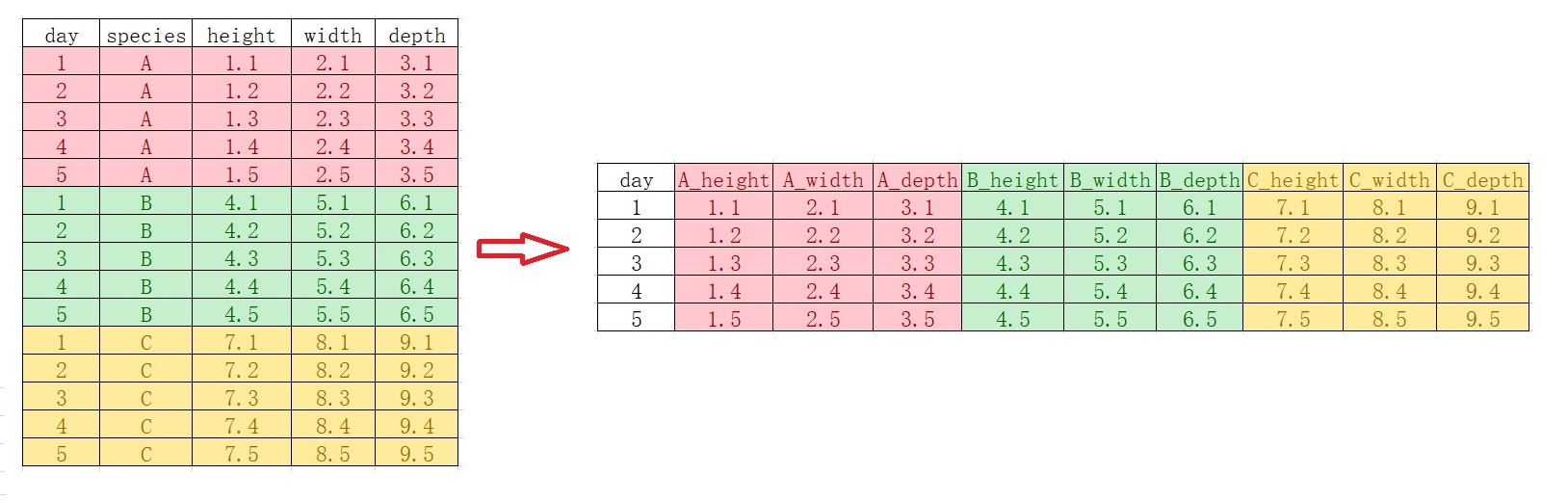
列名转换成多个变量
假定 A, B, C 三种植物每天生长的记录,包括三个特征(height, width, depth)
R
plant_record <- data.frame(
         day = c(1L, 2L, 3L, 4L, 5L),
    A_height = c(1.1, 1.2, 1.3, 1.4, 1.5),
     A_width = c(2.1, 2.2, 2.3, 2.4, 2.5),
     A_depth = c(3.1, 3.2, 3.3, 3.4, 3.5),
    B_height = c(4.1, 4.2, 4.3, 4.4, 4.5),
     B_width = c(5.1, 5.2, 5.3, 5.4, 5.5),
     B_depth = c(6.1, 6.2, 6.3, 6.4, 6.5),
    C_height = c(7.1, 7.2, 7.3, 7.4, 7.5),
     C_width = c(8.1, 8.2, 8.3, 8.4, 8.5),
     C_depth = c(9.1, 9.2, 9.3, 9.4, 9.5)
)
plant_record %>%
knitr::kable()我们想原始数据框的列名,转换成多个变量,比如A,B,C成为物种(species)变量,(height, width, depth)成为parameter变量
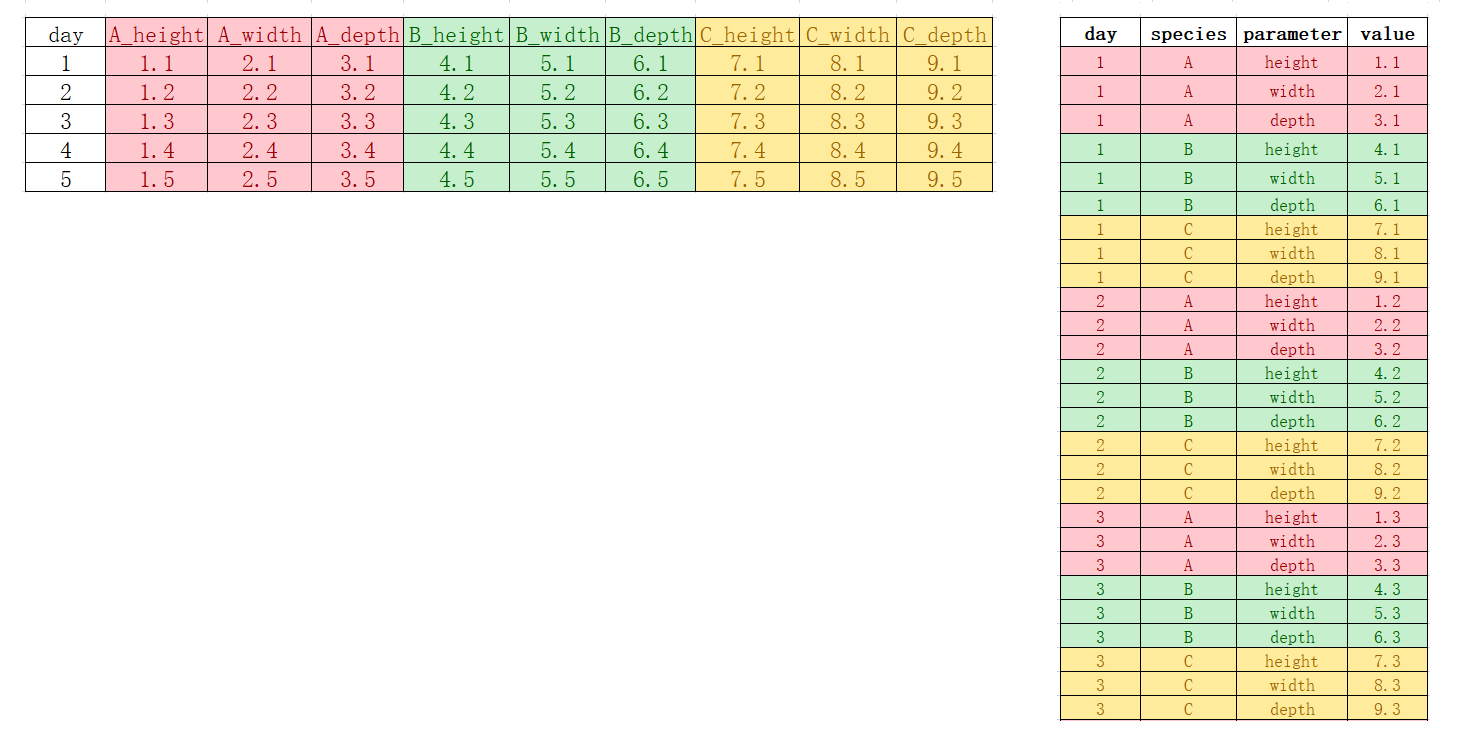
用pivot_longer()函数,
R
plant_record %>%
  tidyr::pivot_longer(
    cols = !day,
    names_to = c("species", "parameter"),
    names_pattern = "(.*)_(.*)",
    values_to = "value"
)
复杂的情形
我们希望原始数据框的列名中,一部分进入变量,一部分保持原来的列名,比如,
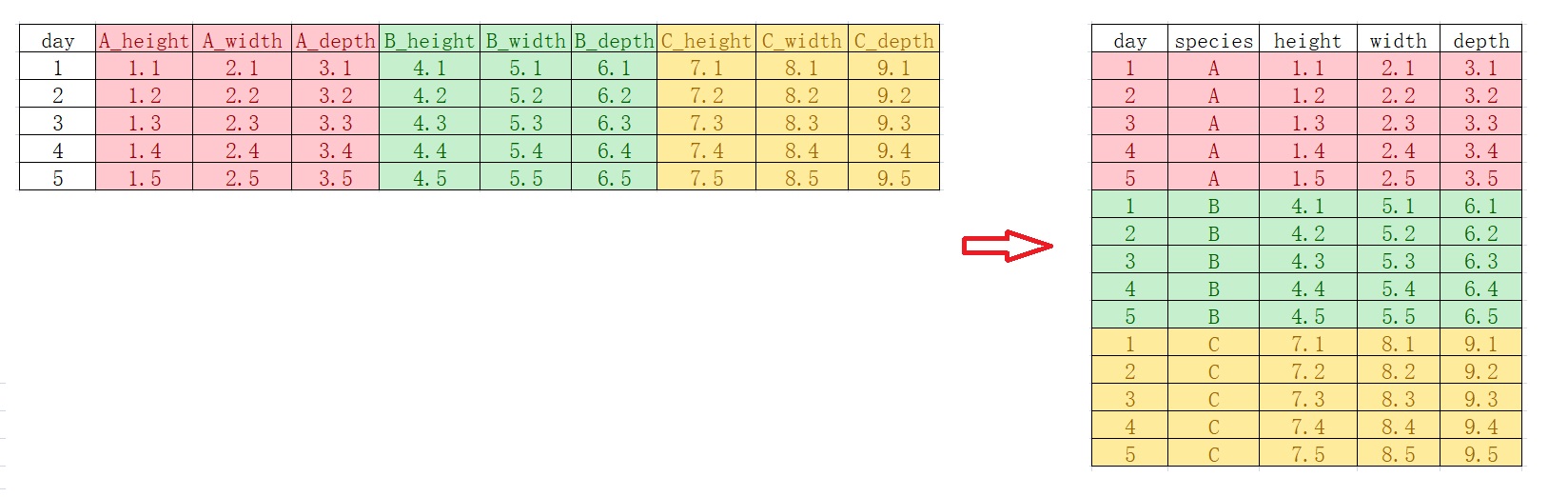
R
plant_record_longer <- plant_record %>%
  tidyr::pivot_longer(
   cols = !day,
   names_to = c("species", ".value"),
   names_pattern = "(.*)_(.*)"
)
plant_record_longer
如果,反过来,又该怎么弄呢?
R
us_rent_income %>%
  pivot_wider(
    names_from = variable,
    names_glue = "{variable}_{.value}",
    values_from = c(estimate, moe)
  )
R
plant_record_longer %>%
  tidyr::pivot_wider(
    names_from = species,
    values_from = c(height, width, depth),
    names_glue = "{species}_{.value}"
  )
{BLOCK TIDYR-6041, TYPE="DANGER"}
看明白`.value`它代表的意思了吗?

- 注意 .value 而不是value,说明这里不是单个列名,而是匹配得到的多个值做列名
tidy data原则
Hadley Wickhamt提出了数据科学tidy原则,我结合自己的理解,tidy思想体现在:
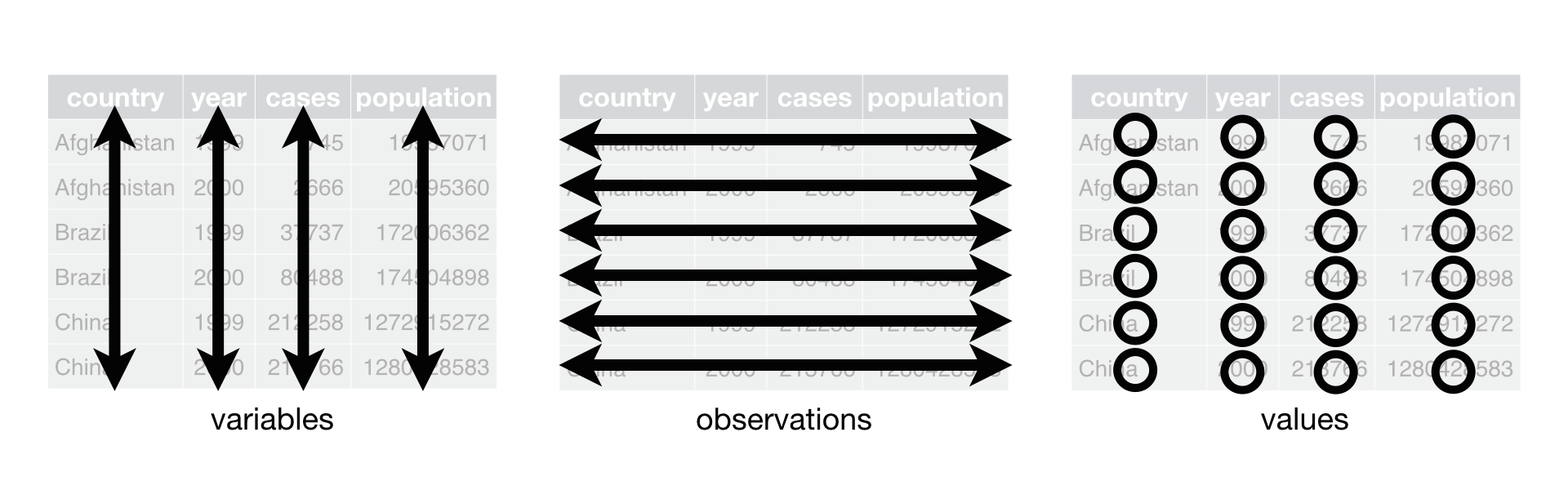
- 一切都是数据框,任何数据都可以规整
- 数据框的一列代表一个变量,数据框的一行代表一次观察
- 函数处理数据时,数据框进数据框出(函数的第一个参数始终为数据框)
根据Hadley Wickham的思想,这里的宽表格(plant_heigt和 wide)不是tidy的,只有长表格(long)才是tidy的,
R
long
{BLOCK TIDYR-16, TYPE="DANGER"}
以后,我们会意识到tidyverse中的很多函数都喜欢tidy的(尤其是ggplot2时)!案例
请见相关章节、相关章节和相关章节.
R
# remove the objects
rm(long, wide, plant_height, plant_record, plant_record_longer)
R
pacman::p_unload(pacman::p_loaded(), character.only = TRUE)