ggplot2 图形
几何形状与图形语法
Tidyverse 篇采菊东篱下,悠然见南山。
根据大家投票,觉得ggplot2是最想掌握的技能,我想这就是R语言中最有质感的部分吧。所以,这里专门拿出一节课讲ggplot2,也算是补上之前相关章节数据可视化没讲的内容。
library(tidyverse)一个有趣的案例
先看一组数据
df <- read_csv("./demo_data/datasaurus.csv")
df先用dataset分组后,然后计算每组下x的均值和方差,y的均值和方差,以及x,y两者的相关系数,我们发现每组数据下它们几乎都是相等的
df %>%
  group_by(dataset) %>%
  summarise(
    across(everything(), list(mean = mean, sd = sd), .names = "{fn}_{col}")
  ) %>%
  mutate(
    across(is.numeric, round, 3)
  )
如果上面代码不熟悉,可以用相关章节的代码重新表达,也是一样的
df %>%
  group_by(dataset) %>%
  summarize(
    mean_x = mean(x),
    mean_y = mean(y),
    std_dev_x = sd(x),
    std_dev_y = sd(y),
    corr_x_y = cor(x, y)
  )
那么,我们是否能得出结论,每组的数据长的差不多呢?然而,我们画图发现
事实上,每张图都相差很大。所以,这里想说明的是,眼见为实。换句话说,可视化是数据探索中非常重要的部分。本章的目的就是带领大家学习ggplot2基本的绘图技能。
学习目标
图形语法
图形语法 “grammar of graphics” ("ggplot2" 中的gg 就来源于此) 使用图层(layer)去描述和构建图形,下图是ggplot2图层概念的示意图 !图片
这个过程类似我们画一幅水彩画

图形部件
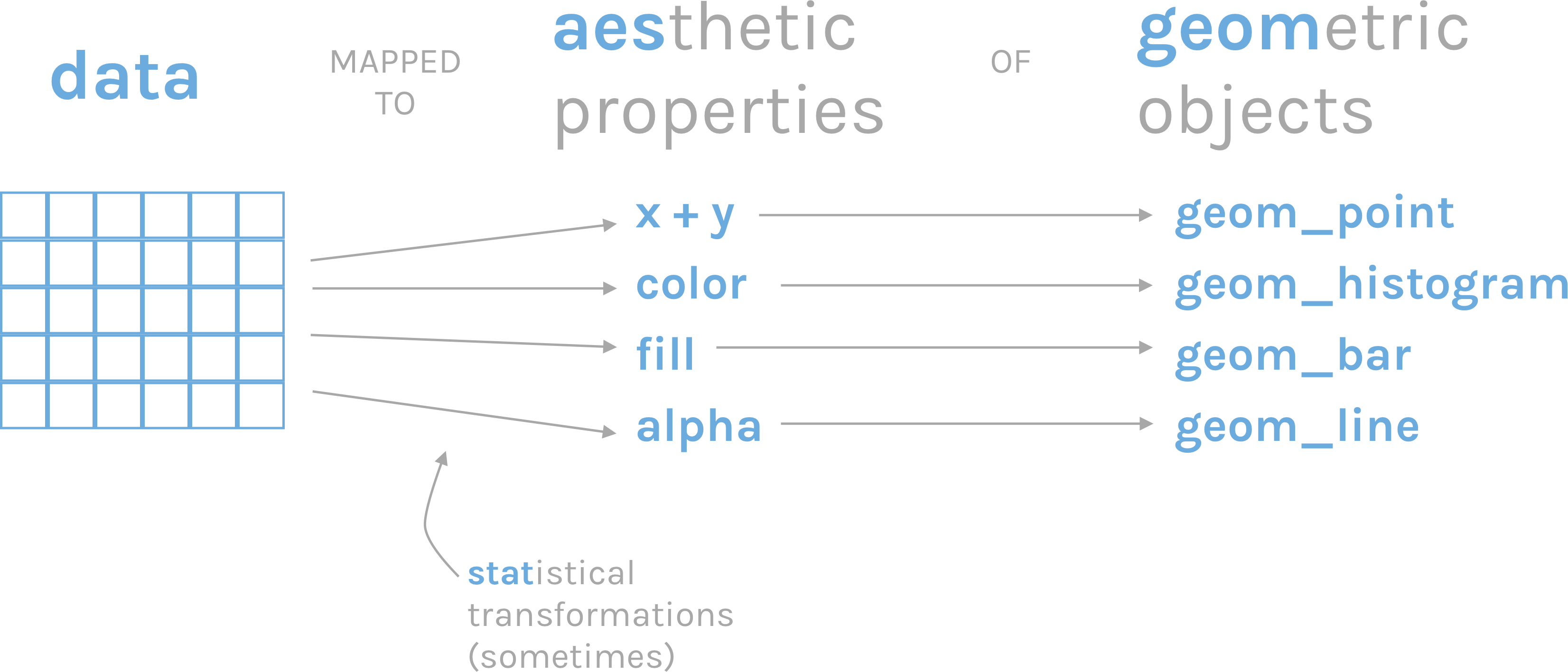
一张统计图形就是从数据到几何形状(geometric object,缩写geom)所包含的图形属性(aesthetic attribute,缩写aes)的一种映射。
data: 数据框data.frame (注意,不支持向量vector和列表list类型)aes: 数据框中的数据变量映射到图形属性。什么叫图形属性?就是图中点的位置、形状,大小,颜色等眼睛能看到的东西。什么叫映射?就是一种对应关系,比如数学中的函数b = f(a)就是a和b之间的一种映射关系,a的值决定或者控制了b的值,在ggplot2语法里,a就是我们输入的数据变量,b就是图形属性, 这些图形属性包括:- x(x轴方向的位置)
- y(y轴方向的位置)
- color(点或者线等元素的颜色)
- size(点或者线等元素的大小)
- shape(点或者线等元素的形状)
- alpha(点或者线等元素的透明度)
geoms: 几何形状,确定我们想画什么样的图,一个geom_***确定一种形状。更多几何形状推荐阅读这里geom_bar()geom_density()geom_freqpoly()geom_histogram()geom_violin()geom_boxplot()geom_col()geom_point()geom_smooth()geom_tile()geom_density2d()geom_bin2d()geom_hex()geom_count()geom_text()geom_sf()
stats: 统计变换scales: 标度coord: 坐标系统facet: 分面layer: 增加图层theme: 主题风格save: 保存图片
开始
R语言数据类型,有字符串型、数值型、因子型、逻辑型、日期型等。
ggplot2会将字符串型、因子型、逻辑型默认为**离散变量**,而数值型默认为**连续变量**,将日期时间为**日期变量**:

- **离散变量**: 字符串型<chr>, 因子型<fct>, 逻辑型<lgl>

- **连续变量**: 双精度数值<dbl>, 整数数值<int>

- **日期变量**: 日期<date>, 时间<time>, 日期时间<dttm>


我们在呈现数据的时候,可能会同时用到多种类型的数据,比如

* 一个离散
* 一个连续

* 两个离散
* 两个连续
* 一个离散, 一个连续

* 三个连续
导入数据
gapdata <- read_csv("./demo_data/gapminder.csv")
gapdata
检查数据
是否有缺失值
gapdata %>%
  summarise(
    across(everything(), ~ sum(is.na(.)))
)country代表国家countinet表示所在的洲year时间lifeExp平均寿命pop人口数量gdpPercap人均GDP
接下来,我们需要思考我们应该选择什么样的图,呈现这些不同类型的数据,探索数据背后的故事基本绘图
柱状图
常用于一个离散变量
gapdata %>%
  ggplot(aes(x = continent)) +
geom_bar()gapdata %>%
ggplot(aes(x = reorder(continent, continent, length))) +
geom_bar()gapdata %>%
ggplot(aes(x = reorder(continent, continent, length))) +
geom_bar() +
coord_flip()# geom_bar vs stat_count
gapdata %>%
ggplot(aes(x = continent)) +
stat_count()gapdata %>% count(continent)可见,geom_bar() 自动完成了这个统计,更多geom与stat对应关系见这里
gapdata %>%
  distinct(continent, country) %>%
  ggplot(aes(x = continent)) +
  geom_bar()
我个人比较喜欢先统计,然后画图
gapdata %>%
  distinct(continent, country) %>%
  group_by(continent) %>%
  summarise(num = n()) %>%
  ggplot(aes(x = continent, y = num)) +
  geom_col()
直方图
常用于一个连续变量
gapdata %>%
  ggplot(aes(x = lifeExp)) +
geom_histogram() # corresponding to stat_bin()gapdata %>%
ggplot(aes(x = lifeExp)) +
geom_histogram(binwidth = 1)geom_histograms(), 默认使用 position = "stack"
gapdata %>%
  ggplot(aes(x = lifeExp, fill = continent)) +
  geom_histogram()
也可以指定 position = "identity"
gapdata %>%
  ggplot(aes(x = lifeExp, fill = continent)) +
  geom_histogram(position = "identity")
频次图
gapdata %>%
  ggplot(aes(x = lifeExp, color = continent)) +
  geom_freqpoly()
密度图
#' smooth histogram = density plot
gapdata %>%
  ggplot(aes(x = lifeExp)) +
  geom_density()
如果不喜欢下面那条线,可以这样
gapdata %>%
  ggplot(aes(x = lifeExp)) +
  geom_line(stat = "density")
geom_density() 中adjust 用于调节bandwidth, adjust = 1/2 means use half of the default bandwidth.
gapdata %>%
  ggplot(aes(x = lifeExp)) +
  geom_density(adjust = 1)

gapdata %>%
  ggplot(aes(x = lifeExp)) +
geom_density(adjust = 0.2)gapdata %>%
ggplot(aes(x = lifeExp, color = continent)) +
geom_density()gapdata %>%
ggplot(aes(x = lifeExp, fill = continent)) +
geom_density(alpha = 0.2)gapdata %>%
filter(continent != "Oceania") %>%
ggplot(aes(x = lifeExp, fill = continent)) +
geom_density(alpha = 0.2)直方图和密度图画在一起。注意y = stat(density) 表示y是由x新生成的变量,这是一种固定写法,类似的还有stat(count), stat(level)
gapdata %>%
  filter(continent != "Oceania") %>%
  ggplot(aes(x = lifeExp, y = stat(density))) +
  geom_histogram(aes(fill = continent)) +
  geom_density()
箱线图
一个离散变量 + 一个连续变量,思考下结果为什么是这样?
gapdata %>%
  ggplot(aes(x = year, y = lifeExp)) +
  geom_boxplot()
数据框中的year变量是数值型,需要先转换成因子型,弄成离散型变量
gapdata %>%
  ggplot(aes(x = as.factor(year), y = lifeExp)) +
  geom_boxplot()
明确指定分组变量
gapdata %>%
  ggplot(aes(x = year, y = lifeExp)) +
geom_boxplot(aes(group = year))gapdata %>%
ggplot(aes(x = year, y = lifeExp)) +
geom_violin(aes(group = year)) +
geom_jitter(alpha = 1 / 4) +
geom_smooth(se = FALSE)抖散图
点重叠的处理方案
gapdata %>%
  ggplot(aes(x = continent, y = lifeExp)) +
geom_point()gapdata %>%
ggplot(aes(x = continent, y = lifeExp)) +
geom_jitter()gapdata %>%
ggplot(aes(x = continent, y = lifeExp)) +
geom_boxplot()gapdata %>%
ggplot(aes(x = continent, y = lifeExp)) +
geom_boxplot() +
geom_jitter()gapdata %>%
ggplot(aes(x = continent, y = lifeExp)) +
geom_jitter() +
stat_summary(fun.y = median, colour = "red", geom = "point", size = 5)gapdata %>%
ggplot(aes(reorder(x = continent, lifeExp), y = lifeExp)) +
geom_jitter() +
stat_summary(fun.y = median, colour = "red", geom = "point", size = 5)注意到我们已经提到过 stat_count / stat_bin / stat_summary
gapdata %>%
  ggplot(aes(x = continent, y = lifeExp)) +
  geom_violin(
    trim = FALSE,
    alpha = 0.5
  ) +
  stat_summary(
    fun.y = mean,
    fun.ymax = function(x) {
      mean(x) + sd(x)
    },
    fun.ymin = function(x) {
      mean(x) - sd(x)
    },
    geom = "pointrange"
  )
山峦图
常用于一个离散变量 + 一个连续变量
gapdata %>%
  ggplot(aes(
    x = lifeExp,
    y = continent,
    fill = continent
  )) +
ggridges::geom_density_ridges()# https://learnui.design/tools/data-color-picker.html#palette
gapdata %>%
ggplot(aes(
x = lifeExp,
y = continent,
fill = continent
)) +
ggridges::geom_density_ridges() +
scale_fill_manual(
values = c("#003f5c", "#58508d", "#bc5090", "#ff6361", "#ffa600")
)gapdata %>%
ggplot(aes(
x = lifeExp,
y = continent,
fill = continent
)) +
ggridges::geom_density_ridges() +
scale_fill_manual(
values = colorspace::sequential_hcl(5, palette = "Peach")
)散点图
常用于两个连续变量
gapdata %>%
  ggplot(aes(x = gdpPercap, y = lifeExp)) +
geom_point()gapdata %>%
ggplot(aes(x = log(gdpPercap), y = lifeExp)) +
geom_point()gapdata %>%
ggplot(aes(x = gdpPercap, y = lifeExp)) +
geom_point() +
scale_x_log10() # A better way to log transformgapdata %>%
ggplot(aes(x = gdpPercap, y = lifeExp)) +
geom_point(aes(color = continent))gapdata %>%
ggplot(aes(x = gdpPercap, y = lifeExp)) +
geom_point(alpha = (1 / 3), size = 2)gapdata %>%
ggplot(aes(x = gdpPercap, y = lifeExp)) +
geom_point() +
geom_smooth()gapdata %>%
ggplot(aes(x = gdpPercap, y = lifeExp)) +
geom_point() +
geom_smooth(lwd = 3, se = FALSE)gapdata %>%
ggplot(aes(x = gdpPercap, y = lifeExp)) +
geom_point() +
geom_smooth(lwd = 3, se = FALSE, method = "lm")gapdata %>%
ggplot(aes(x = gdpPercap, y = lifeExp, color = continent)) +
geom_point() +
geom_smooth(lwd = 3, se = FALSE, method = "lm")jCountries <- c("Canada", "Rwanda", "Cambodia", "Mexico")
gapdata %>%
filter(country %in% jCountries) %>%
ggplot(aes(x = year, y = lifeExp, color = country)) +
geom_line() +
geom_point()gapdata %>%
filter(country %in% jCountries) %>%
ggplot(aes(
x = year, y = lifeExp,
color = reorder(country, -1 * lifeExp, max)
)) +
geom_line() +
geom_point()这是一种技巧,但我更推荐以下方法
d1 <- gapdata %>%
filter(country %in% jCountries) %>%
group_by(country) %>%
mutate(end_label = if_else(year == max(year), country, NA_character_))
d1d1 %>% ggplot(aes(
x = year, y = lifeExp, color = country
)) +
geom_line() +
geom_point() +
geom_label(aes(label = end_label)) +
theme(legend.position = "none")如果觉得麻烦,就用gghighlight宏包吧
gapdata %>%
filter(country %in% jCountries) %>%
ggplot(aes(
x = year, y = lifeExp, color = country
)) +
geom_line() +
geom_point() +
gghighlight::gghighlight()点线图
gapdata %>%
filter(continent == "Asia" & year == 2007) %>%
ggplot(aes(x = lifeExp, y = country)) +
geom_point()gapdata %>%
filter(continent == "Asia" & year == 2007) %>%
ggplot(aes(
x = lifeExp,
y = reorder(country, lifeExp)
)) +
geom_point(color = "blue", size = 2) +
geom_segment(aes(
x = 40,
xend = lifeExp,
y = reorder(country, lifeExp),
yend = reorder(country, lifeExp)
),
color = "lightgrey"
) +
labs(
x = "Life Expectancy (years)",
y = "",
title = "Life Expectancy by Country",
subtitle = "GapMinder data for Asia - 2007"
) +
theme_minimal() +
theme(
panel.grid.major = element_blank(),
panel.grid.minor = element_blank()
)分面
如果想分别画出每个洲的寿命分布图,我们想到的是这样
gapdata %>%
filter(continent == "Africa") %>%
ggplot(aes(x = lifeExp)) +
geom_density()
gapdata %>%
filter(continent == "Americas") %>%
ggplot(aes(x = lifeExp)) +
geom_density()
gapdata %>%
filter(continent == "Asia") %>%
ggplot(aes(x = lifeExp)) +
geom_density()
gapdata %>%
filter(continent == "Europe") %>%
ggplot(aes(x = lifeExp)) +
geom_density()
gapdata %>%
filter(continent == "Oceania") %>%
ggplot(aes(x = lifeExp)) +
geom_density()事实上,ggplot2的分面,可以很快捷的完成。分面有两个
facet_grid()facet_wrap()
facet_grid()
- create a grid of graphs, by rows and columns
- use
vars()to call on the variables - adjust scales with
scales = "free"
gapdata %>%
ggplot(aes(x = lifeExp)) +
geom_density() +
facet_grid(. ~ continent)gapdata %>%
filter(continent != "Oceania") %>%
ggplot(aes(x = lifeExp, fill = continent)) +
geom_histogram() +
facet_grid(continent ~ .)gapdata %>%
filter(continent != "Oceania") %>%
ggplot(aes(x = lifeExp, y = stat(density))) +
geom_histogram(aes(fill = continent)) +
geom_density() +
facet_grid(continent ~ .)facet_wrap()
- create small multiples by "wrapping" a series of plots
- use
vars()to call on the variables nrowandncolarguments for dictating shape of grid
gapdata %>%
ggplot(aes(x = gdpPercap, y = lifeExp, color = continent)) +
geom_point(show.legend = FALSE) +
facet_wrap(~continent)文本标注
gapdata %>%
ggplot(aes(x = gdpPercap, y = lifeExp)) +
geom_point() +
ggforce::geom_mark_ellipse(aes(
filter = gdpPercap > 70000,
label = "Rich country",
description = "What country are they?"
))ten_countries <- gapdata %>%
distinct(country) %>%
pull() %>%
sample(10)library(ggrepel)
gapdata %>%
filter(year == 2007) %>%
mutate(
label = ifelse(country %in% ten_countries, as.character(country), "")
) %>%
ggplot(aes(log(gdpPercap), lifeExp)) +
geom_point(
size = 3.5,
alpha = .9,
shape = 21,
col = "white",
fill = "#0162B2"
) +
geom_text_repel(
aes(label = label),
size = 4.5,
point.padding = .2,
box.padding = .3,
force = 1,
min.segment.length = 0
) +
theme_minimal(14) +
theme(
legend.position = "none",
panel.grid.minor = element_blank()
) +
labs(
x = "log(GDP per capita)",
y = "life expectancy"
)errorbar图
avg_gapdata <- gapdata %>%
group_by(continent) %>%
summarise(
mean = mean(lifeExp),
sd = sd(lifeExp)
)
avg_gapdataavg_gapdata %>%
ggplot(aes(continent, mean, fill = continent)) +
# geom_col(alpha = 0.5) +
geom_point() +
geom_errorbar(aes(ymin = mean - sd, ymax = mean + sd), width = 0.25)椭圆图
gapdata %>%
  ggplot(aes(x = log(gdpPercap), y = lifeExp)) +
geom_point() +
stat_ellipse(type = "norm", level = 0.95)2D 密度图
与一维的情形geom_density()类似, geom_density_2d(), geom_bin2d(), geom_hex()常用于刻画两个变量构成的二维区间的密度
gapdata %>%
  ggplot(aes(x = gdpPercap, y = lifeExp)) +
geom_bin2d()gapdata %>%
ggplot(aes(x = gdpPercap, y = lifeExp)) +
geom_hex()马赛克图
geom_tile(), geom_contour(), geom_raster()常用于3个变量
gapdata %>%
  group_by(continent, year) %>%
  summarise(mean_lifeExp = mean(lifeExp)) %>%
  ggplot(aes(x = year, y = continent, fill = mean_lifeExp)) +
  geom_tile() +
  scale_fill_viridis_c()
事实上可以有更好的呈现方式
gapdata %>%
  group_by(continent, year) %>%
  summarise(mean_lifeExp = mean(lifeExp)) %>%
  ggplot(aes(x = year, y = continent, size = mean_lifeExp)) +
geom_point()gapdata %>%
group_by(continent, year) %>%
summarise(mean_lifeExp = mean(lifeExp)) %>%
ggplot(aes(x = year, y = continent, size = mean_lifeExp)) +
geom_point(shape = 21, color = "red", fill = "white") +
scale_size_continuous(range = c(7, 15)) +
geom_text(aes(label = round(mean_lifeExp, 2)), size = 3, color = "black") +
theme(legend.position = "none")课后思考题
哪画图的代码中,哪两张图的结果是一样?为什么?
library(tidyverse)
tbl <-
  tibble(
    x = rep(c(1, 2, 3), times = 2),
    y = 1:6,
    group = rep(c("group1", "group2"), each = 3)
  )
ggplot(tbl, aes(x, y)) + geom_line()
ggplot(tbl, aes(x, y, group = group)) + geom_line()
ggplot(tbl, aes(x, y, fill = group)) + geom_line()
ggplot(tbl, aes(x, y, color = group)) + geom_line()
参考资料
- Look at Data from Data Vizualization for Social Science
- Chapter 3: Data Visualisation of R for Data Science
- Chapter 28: Graphics for communication of R for Data Science
- Graphs in R Graphics Cookbook
- ggplot2 cheat sheet
- ggplot2 documentation
- The R Graph Gallery (this is really useful)
- Top 50 ggplot2 Visualizations
- R Graphics Cookbook by Winston Chang
- ggplot extensions
- plotly for creating interactive graphs
# remove the objects
# rm(list=ls())
rm(avg_gapdata, d1, df, gapdata, jCountries, ten_countries)pacman::p_unload(pacman::p_loaded(), character.only = TRUE)