ggplot2 动画
gganimate 数据动画
Tidyverse 篇这节课,我们讲如何让我们的图动起来。(因为渲染需要花费很长时间,所以文档中的动图代码都没有执行。)
为什么要使用动图
- 改进了图形在时间上和空间上的重新定位
- 传递更多信息
- 引人注意
gganimate宏包
动图可以将其理解为多张静态图堆在一起,当然不是随意的堆放,而是按照一定的规则,比如按照时间的顺序,或者类别的顺序。一般而言,动图制作包括两个步骤: 静态图制作及图形组装。静态图制作,前面几章我们讲过主要用ggplot2宏包实现;对于图形组装,需要用到今天我们要讲Thomas Lin Pedersen的gganimate宏包,来自同一工厂的产品,用起来自然是无缝衔接啦。
install.packages("gganimate")先来一张静态图
library(tidyverse)
library(covdata) # remotes::install_github("kjhealy/covdata")
library(gganimate)covdata::covnat %>%
dplyr::filter(iso3 == "USA") %>%
dplyr::filter(cu_cases > 0) %>%
ggplot(aes(x = date, y = cases)) +
geom_path() +
labs(
title = "美国新冠肺炎累积确诊病例",
subtitle = "数据来源https://kjhealy.github.io/covdata/"
)让它动起来,我们只需要增加一行代码!
covdata::covnat %>%
  dplyr::filter(iso3 == "USA") %>%
  dplyr::filter(cu_cases > 0) %>%
  ggplot(aes(x = date, y = cases)) +
  geom_path() +
  labs(
    title = "美国新冠肺炎累积确诊病例 {frame_along}",
    subtitle = "数据来源https://kjhealy.github.io/covdata/"
  ) +
  transition_reveal(along = date)
相对复杂点的例子
library(datasauRus)
ggplot(datasaurus_dozen) +
  aes(x, y, color = dataset) +
  geom_point()
用分面展示
ggplot(datasaurus_dozen) +
  aes(x, y, color = dataset) +
  geom_point() +
  facet_wrap(~dataset)
可以用动图展示
ggplot(datasaurus_dozen) +
  aes(x, y, color = dataset) +
  geom_point() +
  transition_states(dataset, 3, 1) + # <<
  labs(title = "Dataset: {closest_state}")
是不是很炫酷,下面我们就一个个讲解其中的函数。
The grammar of animation
使用gganimate做动画,只需要掌握以下五类函数:
transition_*(): 定义动画是根据哪个变量进行”动”,以及如何”动”view_*(): 定义坐标轴随数据变化.shadow_*(): 影子(旧数据的历史记忆)?定义点相继出现的方式.enter_()/exit_(): 定义新数据出现和旧数据退去的方式.ease_aes(): 美观定义,控制变化的节奏(如何让整个动画看起来更舒适).
下面通过案例依次讲解这些函数功能。
希望动画随哪个变量动起来
变量如何选择,这需要从变量类型和变量代表的信息来确定。
transition_states
transition_states(states = ), 这里的参数states往往带有分组信息,可以等价于静态图中的分面。
diamonds %>%
  ggplot(aes(carat, price)) +
geom_point()diamonds %>%
ggplot(aes(carat, price)) +
geom_point() +
facet_wrap(vars(color))diamonds %>%
ggplot(aes(carat, price)) +
geom_point() +
transition_states(states = color, transition_length = 3, state_length = 1)transition_time
transition_time(time = ), 这里的time一般认为是连续的值,相比于transition_states,没有了transtion_length这个选项,是因为transtion_length默认为time. 事实上,transition_time是transition_states的一种特例,但其实也有分组的要求
library(ggplot2)
library(gganimate)
library(gapminder)

plot <- ggplot(gapminder, aes(gdpPercap, lifeExp, size = pop, color = country)) +
  geom_point(alpha = 0.7, show.legend = FALSE) +
  scale_colour_manual(values = gapminder::country_colors) +
  scale_size(range = c(2, 12)) +
  scale_x_log10() +
  facet_wrap(vars(continent)) +
  labs(title = "Year: {frame_time}", x = "GDP Per capita", y = "life expectancy") +
  transition_time(year) +
  ease_aes("linear")
plot
# save as a GIF
# animate(plot, fps = 30, width = 750, height = 750)
# anim_save("gapminder.gif")p <- gapminder::gapminder %>%
ggplot(aes(x = gdpPercap, y = lifeExp, size = pop, colour = country)) +
geom_point(alpha = 0.7, show.legend = FALSE) +
scale_size(range = c(2, 12)) +
scale_x_log10() +
labs(
x = "GDP per capita",
y = "life expectancy"
)
panim <- p +
transition_time(time = year) +
labs(title = "year: {frame_time}")
animtransition_reveal
transition_reveal(along = ), along 这个词可以看出,它是按照某个变量依次显示的意思,比如顺着x轴显示
ggplot(data = economics) +
  aes(x = date, y = unemploy) +
geom_line()ggplot(economics) +
aes(x = date, y = unemploy) +
geom_line() +
transition_reveal(along = date) +
labs(title = "now is {frame_along}")transition_filter
transition_filter( 至少2个筛选条件,transition_length = , filter_length =), 动图将会在这些筛选条件对应的子图之间转换
diamonds %>%
  ggplot(aes(carat, price)) +
  geom_point() +
  transition_filter(
    transition_length = 3,
    filter_length = 1,

    cut == "Ideal",
    Deep = depth >= 60
  )
transition_layers
transition_layers(): 依次显示每个图层
mtcars %>%
  ggplot(aes(mpg, disp)) +
  geom_point() +
  geom_smooth(colour = "grey", se = FALSE) +
  geom_smooth(aes(colour = factor(gear))) +
  transition_layers(
    layer_length = 1, transition_length = 2,
    from_blank = FALSE, keep_layers = c(Inf, 0, 0)
  ) +
  enter_fade() +
  exit_fade()
其他
transition_manual()transition_components()transition_events()
希望坐标轴随数据动起来
动画过程中,绘图窗口怎么变化呢?
view_follow
ggplot(iris, aes(Sepal.Length, Sepal.Width)) +
  geom_point() +
  labs(title = "{closest_state}") +
  transition_states(Species, transition_length = 4, state_length = 1) +
  view_follow()
其它
view_step()view_step_manual()view_zoom()view_zoom_manual()
希望动画有个记忆
shadow_wake(wake_length =, )旧数据消退时,制造点小小的尾迹的效果(wake除了叫醒,还有尾迹的意思,合起来就是记忆_尾迹)shadow_trail(distance = 0.05)旧数据消退时,制造面包屑一样的残留痕迹(记忆_零星残留)shadow_mark(past = TRUE, future = FALSE)将旧数据和新数据当作背景(记忆_标记)
shadow_wake()
p +
  transition_time(time = year) +
  labs(title = "year: {frame_time}") +
shadow_wake(wake_length = 0.1, alpha = FALSE)ggplot(iris, aes(Petal.Length, Sepal.Length)) +
geom_point(size = 2) +
labs(title = "{closest_state}") +
transition_states(Species, transition_length = 4, state_length = 1) +
shadow_wake(wake_length = 0.1)shadow_trail()
p +
  transition_time(time = year) +
  labs(title = "year: {frame_time}") +
shadow_trail(distance = 0.1)ggplot(iris, aes(Petal.Length, Sepal.Length)) +
geom_point(size = 2) +
labs(title = "{closest_state}") +
transition_states(Species, transition_length = 4, state_length = 1) +
shadow_trail(distance = 0.1)shadow_mark()
p +
  transition_time(time = year) +
  labs(title = "year: {frame_time}") +
shadow_mark(alpha = 0.3, size = 0.5)ggplot(airquality, aes(Day, Temp)) +
geom_line(color = "red", size = 1) +
transition_time(Month) +
shadow_mark(colour = "black", size = 0.75)定义新数据出现和旧数据退去的方式
出现和退去的函数是成对的
enter/exit_fade()
透明度上的变化,我这里用柱状图展示,效果要明显一点。
tibble(
  x = month.name,
  y = sample.int(12)
) %>%
  ggplot(aes(x = x, y = y)) +
  geom_col() +
  theme(axis.text.x = element_text(angle = 45, hjust = 1, vjust = 1)) +
transition_states(states = month.name)tibble(
x = month.name,
y = sample.int(12)
) %>%
ggplot(aes(x = x, y = y)) +
geom_col() +
theme(axis.text.x = element_text(angle = 45, hjust = 1, vjust = 1)) +
transition_states(states = month.name) +
shadow_mark(past = TRUE) +
enter_fade()p +
transition_time(time = year) +
labs(title = "year: {frame_time}") +
enter_fade()enter_grow()/exit_shrink()
大小上的变化
tibble(
  x = month.name,
  y = sample.int(12)
) %>%
  ggplot(aes(x = x, y = y)) +
  geom_col() +
  theme(axis.text.x = element_text(angle = 45, hjust = 1, vjust = 1)) +
  transition_states(states = month.name) +
  shadow_mark(past = TRUE) +
enter_grow()p +
transition_time(time = year) +
labs(title = "year: {frame_time}") +
enter_grow() +
enter_fade()控制变化的节奏
控制数据点变化的快慢
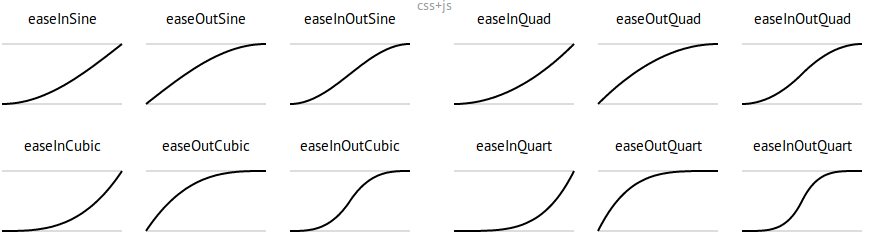
Source: https://easings.net/
看下面的案例:diamonds %>% ggplot(aes(carat, price)) + geom_point() + transition_states(color, transition_length = 3, state_length = 1) + ease_aes("cubic-in") # Change easing of all aesthetics
diamonds %>% ggplot(aes(carat, price)) + geom_point() + transition_states(color, transition_length = 3, state_length = 1) + ease_aes(x = "elastic-in") # Only change x (others remain “linear”)
## 标签

我们可能需要在标题中加入每张动画的信息,常用罗列如下
transition_states(states = ) + labs(title = "previous is {previous_state}, current is {closest_state}, next is {next_state}")
transition_layers() + labs(title = "previous is {previous_layers}, current is {closest_layers}, next is {next_layers}")
transition_time(time = ) + labs(title = "now is {frame_time}")
transition_reveal(along = ) + labs(title = "now is {frame_along}")
## 保存

### Renderer options
tibble::tribble( ~Function, ~Description, "gifski_renderer", "Default, super fast gif renderer.", "magick_renderer", "Somewhat slower gif renderer.", "ffmpeg_renderer", "Uses ffmpeg to create a video from the animation.", "av_renderer", "Uses the av package to create a video (using ffmpeg).", "file_renderer", "Dumps a list of image frames from the animation.", "sprite_renderer", "Creates a spritesheet from frames of the animation." )
### 常用方法

一般用`anim_save()`保存为 gif 格式,方法类似`ggsave()`
animation_to_save <- diamonds %>% ggplot(aes(carat, price)) + geom_point() + transition_states(color, transition_length = 3, state_length = 1) + ease_aes("cubic-in")
anim_save("first_saved_animation.gif", animation = animation_to_save)
## 案例演示一


这是网上有段时间比较火的racing_bar图
ranked_by_date <- covdata::covnat %>% group_by(date) %>% arrange(date, desc(cu_cases)) %>% mutate(rank = 1:n()) %>% filter(rank <= 10) %>% ungroup()
ranked_by_date %>% filter(date >= "2020-05-01") %>% ggplot( aes(x = rank, y = cname, group = cname, fill = cname) ) + geom_tile( aes( y = cu_cases / 2, height = cu_cases, width = 0.9 ), alpha = 0.8, show.legend = F ) + geom_text(aes( y = cu_cases, label = cname ), show.legend = FALSE ) + scale_x_reverse( breaks = c(1:10), label = c(1:10) ) + theme_minimal() + coord_flip(clip = "off", expand = FALSE) + labs( title = "日期: {closest_state}", x = "", caption = "Source: github/kjhealy/covdata" ) + transition_states(date, transition_length = 4, state_length = 1, wrap = TRUE ) + ease_aes("cubic-in-out")
## 案例演示二
bats <- readr::read_csv("./demo_data/bats-subset.csv") %>% dplyr::mutate(id = factor(id))
bats %>% ggplot(aes( x = longitude, y = latitude, group = id, color = id )) + geom_point()
### 常规的方法
bats %>% ggplot(aes( x = longitude, y = latitude, group = id, color = id )) + geom_point() + transition_time(time) + shadow_mark(past = TRUE)
- geom_path()是按照数据点出现的先后顺序
- geom_line()是按照数据点在x轴的顺序
bats %>% ggplot(aes( x = longitude, y = latitude, group = id, color = id )) + geom_path() + transition_time(time) + shadow_mark(past = TRUE)
### 炫酷点的
bats %>% dplyr::mutate( image = "images/bat-cartoon.png" ) %>% ggplot(aes( x = longitude, y = latitude, group = id, color = id )) + geom_path() + ggimage::geom_image(aes(image = image), size = 0.1) + transition_reveal(time)
## 案例演示三

全球R-Ladies组织,会议活动的情况,我们在地图上用动图展示
rladies <- read_csv("./demo_data/rladies.csv") rladies
这里需要一个地图,可以这样ggplot() + ggplot2::borders("world", colour = "gray85", fill = "gray80") + ggthemes::theme_map()
当然,最好是这样library(maps) world <- map_data("world")
world_map <- ggplot() + geom_polygon(data = world, aes(x = long, y = lat, group = group), color = "white", fill = "gray80" ) + ggthemes::theme_map()
world_map
然后把点打上去world_map + geom_point( data = rladies, aes(x = lon, y = lat, size = followers), colour = "purple", alpha = .5 ) + scale_size_continuous( range = c(1, 8), breaks = c(250, 500, 750, 1000) ) + labs(size = "Followers")
用动图展示(这种方法常用在流行病传播的展示上)
world_map + geom_point(aes(x = lon, y = lat, size = followers), data = rladies, colour = "purple", alpha = .5 ) + scale_size_continuous( range = c(1, 8), breaks = c(250, 500, 750, 1000) ) + transition_states(created_at) + shadow_mark(past = TRUE) + labs(title = "Day: {closest_state}")
## 课后作业

### 作业1

把下图弄成你喜欢的样子
library(gapminder) theme_set(theme_bw())
ggplot(gapminder) + aes( x = gdpPercap, y = lifeExp, size = pop, colour = country ) + geom_point(show.legend = FALSE) + scale_x_log10() + scale_color_viridis_d() + scale_size(range = c(2, 12)) + labs(x = "GDP per capita", y = "Life expectancy") + transition_time(year) + labs(title = "Year: {frame_time}")
### 作业2

那请说说这以下三个的区别?
bats %>% dplyr::filter(id == 1) %>% ggplot( aes( x = longitude, y = latitude ) ) + geom_point() + transition_reveal(time) # <<
bats %>% dplyr::filter(id == 1) %>% ggplot( aes( x = longitude, y = latitude ) ) + geom_point() + transition_states(time) # <<
bats %>% dplyr::filter(id == 1) %>% ggplot( aes( x = longitude, y = latitude ) ) + geom_point() + transition_time(time) # <<
pacman::p_unload(pacman::p_loaded(), character.only = TRUE)