Tidymodels 入门
现代建模框架
Tidymodels 篇Rstudio工厂的 Max Kuhn 大神正主持机器学习的开发,日臻成熟了,感觉很强大啊。
R
library(tidyverse)
library(tidymodels)
数据
R
penguins <- read_csv("./demo_data/penguins.csv") %>%
  janitor::clean_names() %>%
  drop_na()

penguins %>%
  head()
R
penguins %>%
  ggplot(aes(x = bill_length_mm, y = bill_depth_mm,
             color = species, shape = species)
         ) +
  geom_point()
机器学习
R
split <- penguins %>%
  mutate(species = as_factor(species)) %>%
  mutate(species = fct_lump(species, 1)) %>%
  initial_split()

split

training_data <- training(split)
training_data
testing_data <- testing(split)
testing_data
model01
R
model_logistic <- parsnip::logistic_reg() %>%
  set_engine("glm") %>%
  set_mode("classification") %>%
  fit(species ~ bill_length_mm + bill_depth_mm, data = training_data)


bind_cols(
  predict(model_logistic, new_data = testing_data, type = "class"),
  predict(model_logistic, new_data = testing_data, type = "prob"),
  testing_data
)


predict(model_logistic, new_data = testing_data) %>%
  bind_cols(testing_data) %>%
  count(.pred_class, species)
model02
R
model_neighbor <- parsnip::nearest_neighbor(neighbors = 10) %>%
  set_engine("kknn") %>%
  set_mode("classification") %>%
  fit(species ~ bill_length_mm, data = training_data)

predict(model_neighbor, new_data = testing_data) %>%
  bind_cols(testing_data) %>%
  count(.pred_class, species)
model03
R
model_multinom <- parsnip::multinom_reg() %>%
  set_engine("nnet") %>%
  set_mode("classification") %>%
  fit(species ~ bill_length_mm, data = training_data)

predict(model_multinom, new_data = testing_data) %>%
  bind_cols(testing_data) %>%
  count(.pred_class, species)
model04
R
model_decision <- parsnip::decision_tree() %>%
  set_engine("rpart") %>%
  set_mode("classification") %>%
  fit(species ~ bill_length_mm, data = training_data)

predict(model_decision, new_data = testing_data) %>%
  bind_cols(testing_data) %>%
  count(.pred_class, species)
workflow
使用 recipes
R
library(tidyverse)
library(tidymodels)
library(workflows)

penguins <- readr::read_csv("./demo_data/penguins.csv") %>%
  janitor::clean_names()


split <- penguins %>%
  tidyr::drop_na() %>%
  rsample::initial_split(prop = 3/4)

training_data <- rsample::training(split)
testing_data <- rsample::testing(split)参考tidy modeling in R, 被预测变量在分割前,应该先处理,比如标准化。 但这里的案例,我为了偷懒,被预测变量bill_length_mm,暂时保留不变。 预测变量做标准处理。
R
penguins_lm <-
  parsnip::linear_reg() %>%
  #parsnip::set_engine("lm")
  parsnip::set_engine("stan")

penguins_recipe  <-
  recipes::recipe(bill_length_mm ~ bill_depth_mm + sex, data = training_data) %>%
  recipes::step_normalize(all_numeric(), -all_outcomes()) %>%
  recipes::step_dummy(all_nominal())


broom::tidy(penguins_recipe)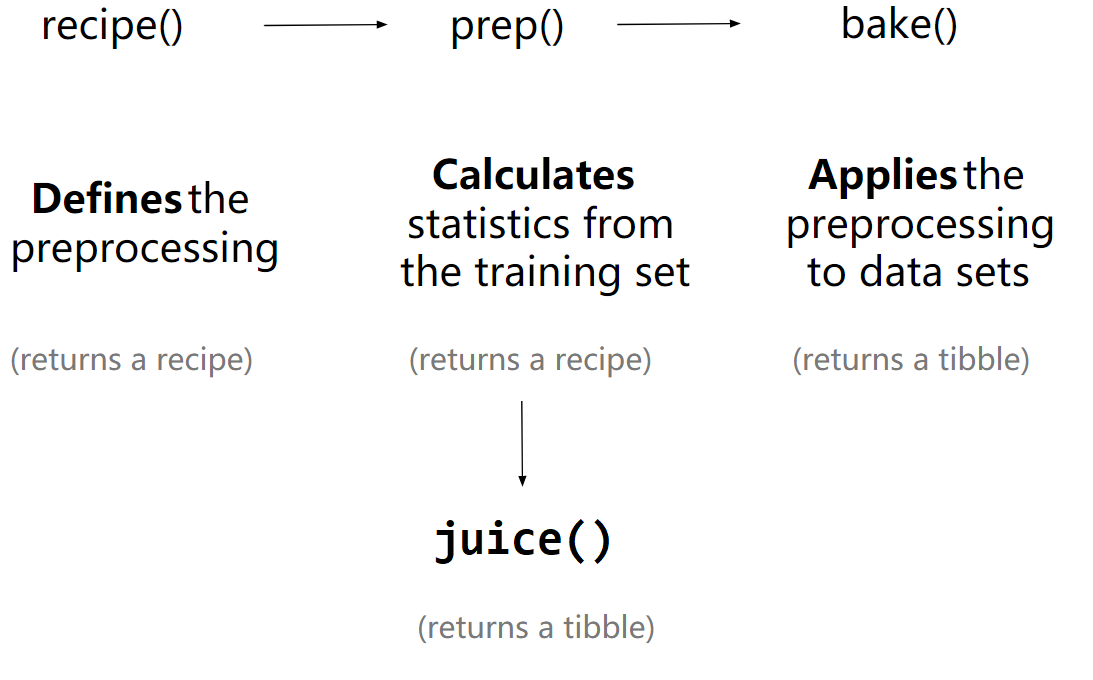
R
penguins_recipe %>%
  recipes::prep(data = training_data) %>%  #or prep(retain = TRUE)
  recipes::juice()


penguins_recipe %>%
  recipes::prep(data = training_data) %>%
  recipes::bake(new_data = testing_data)   # recipe used in new_data


train_data <-
  penguins_recipe %>%
  recipes::prep(data = training_data) %>%
  recipes::bake(new_data = NULL)


test_data <-
  penguins_recipe %>%
  recipes::prep(data = training_data) %>%
  recipes::bake(new_data = testing_data)
workflows的思路更清晰
workflows的思路让模型结构更清晰。 这样prep(), bake(), and juice() 就可以省略了,只需要recipe和model,他们往往是成对出现的
R
wflow <-
  workflows::workflow() %>%
  workflows::add_recipe(penguins_recipe) %>%
  workflows::add_model(penguins_lm)


wflow_fit <-
  wflow %>%
  parsnip::fit(data = training_data)
R
wflow_fit %>%
  workflows::pull_workflow_fit() %>%
  broom.mixed::tidy()

wflow_fit %>%
  workflows::pull_workflow_prepped_recipe()
先提取模型,用在 predict() 是可以的,但这样太麻烦了
R
wflow_fit %>%
  workflows::pull_workflow_fit() %>%
stats::predict(new_data = test_data) # note: test_data not testing_data因为,predict() 会自动的将recipes(对training_data的操作),应用到testing_data 这个不错,参考这里
R
penguins_pred <-
  predict(
    wflow_fit,
    new_data = testing_data %>% dplyr::select(-bill_length_mm), # note: testing_data not test_data
    type = "numeric"
  ) %>%
  dplyr::bind_cols(testing_data %>% dplyr::select(bill_length_mm))

penguins_pred
R
penguins_pred %>%
  ggplot(aes(x = bill_length_mm, y = .pred)) +
  geom_abline(linetype = 2) +
  geom_point(alpha = 0.5) +
labs(y = "Predicted ", x = "bill_length_mm")augment()具有predict()一样的功能和特性,还更简练的多
R
wflow_fit %>%
  augment(new_data = testing_data) %>%       # note: testing_data not test_data
  ggplot(aes(x = bill_length_mm, y = .pred)) +
  geom_abline(linetype = 2) +
  geom_point(alpha = 0.5) +
  labs(y = "Predicted ", x = "bill_length_mm")
模型评估
参考<https://www.tmwr.org/performance.html#regression-metrics>
R
penguins_pred %>%
  yardstick::rmse(truth = bill_length_mm, estimate = .pred)
自定义一个指标评价函数my_multi_metric,就是放一起,感觉不够tidyverse
R
my_multi_metric <- yardstick::metric_set(rmse, rsq, mae, ccc)

penguins_pred %>%
  my_multi_metric(truth = bill_length_mm, estimate = .pred)
R
# remove the objects
# ls() %>% stringr::str_flatten(collapse = ", ")

rm(my_multi_metric, penguins, penguins_lm, penguins_pred, penguins_recipe, split, testing_data, training_data, wflow, wflow_fit)
R
pacman::p_unload(pacman::p_loaded(), character.only = TRUE)