企鹅数据集
经典数据集全面分析
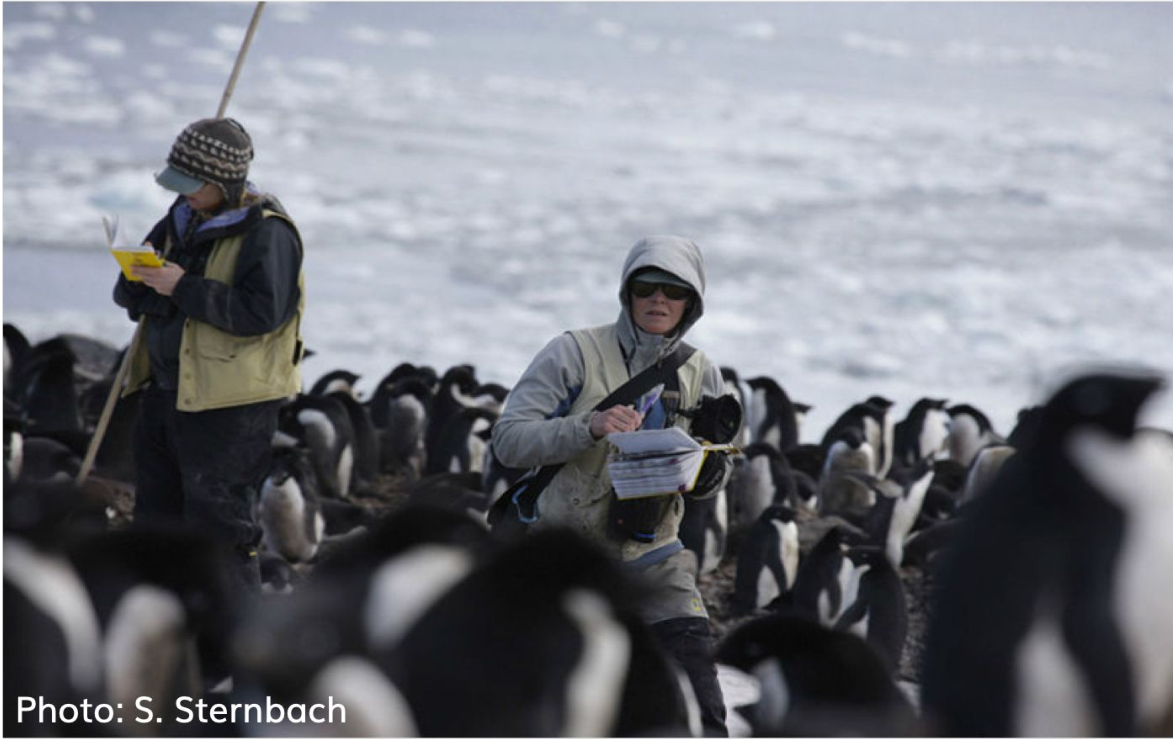
应用篇今天讲一个关于企鹅的数据故事。这个故事来源于科考人员记录的大量企鹅体征数据,图片来源这里.
数据
导入数据
可通过宏包palmerpenguins::penguins获取数据,也可以读取本地penguins.csv文件, 我们采取后面一种方法:
library(tidyverse)
penguins <- read_csv("./demo_data/penguins.csv") %>%
  janitor::clean_names()

penguins %>%
  head()
变量含义
| variable | class | description |
|---|---|---|
| species | integer | 企鹅种类 (Adelie, Gentoo, Chinstrap) |
| island | integer | 所在岛屿 (Biscoe, Dream, Torgersen) |
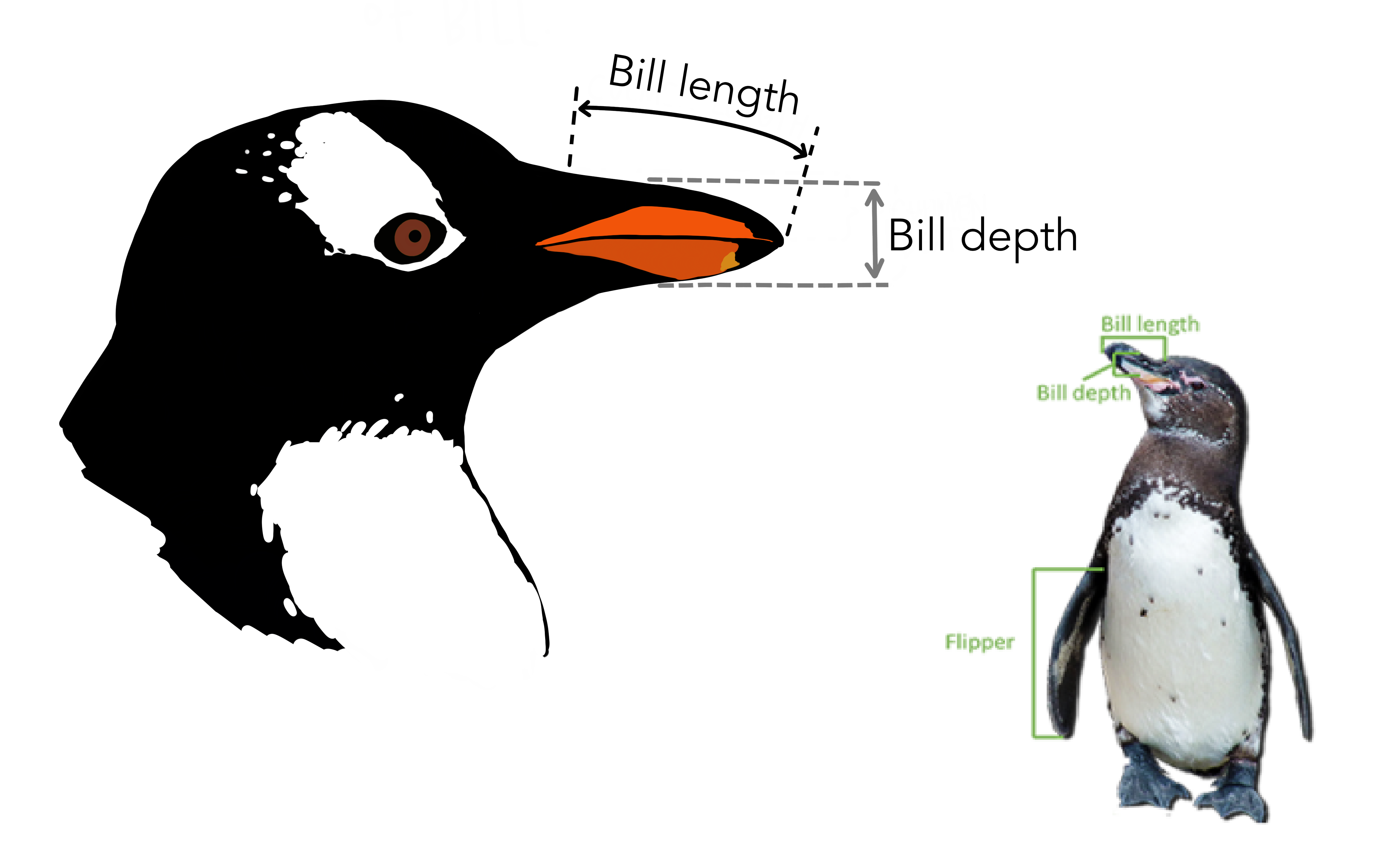
| bill_length_mm | double | 嘴峰长度 (单位毫米) |
| bill_depth_mm | double | 嘴峰深度 (单位毫米) |
| flipper_length_mm | integer | 鰭肢长度 (单位毫米) |
| body_mass_g | integer | 体重 (单位克) |
| sex | integer | 性别 |
| year | integer | 记录年份 |
数据清洗
检查缺失值(NA)这个很重要!
penguins %>% summarise(
  across(everything(), ~ sum(is.na(.)))
)
有缺失值的地方找出来看看
penguins %>% filter_all(
  any_vars(is.na(.))
)
发现共有11行至少有一处有缺失值,于是我们就删除这些行
penguins <- penguins %>% drop_na()
penguins
探索性分析
大家可以提出自己想探索的内容:
- 每种类型企鹅有多少只?
- 每种类型企鹅各种属性的均值和分布?
- 嘴峰长度和深度的关联?
- 体重与翅膀长度的关联?
- 嘴峰长度与嘴峰深度的比例?
- 不同种类的宝宝,体重具有显著性差异?
- 这体征中哪个因素对性别影响最大?
- ...
每种类型企鹅有多少只
penguins %>%
  count(species, sort = T)
每个岛屿有多少企鹅?
penguins %>%
  count(island, sort = T)
每种类型企鹅各种体征属性的均值和分布
penguins %>%
  group_by(species) %>%
  summarize(across(where(is.numeric), mean, na.rm = TRUE))
每种类型企鹅的嘴峰长度的分布
penguins %>%
  ggplot(aes(x = bill_length_mm)) +
  geom_density() +
  facet_wrap(vars(species), scales = "free")
每种类型企鹅的嘴峰长度的分布(分性别)
penguins %>%
  ggplot(aes(x = bill_length_mm)) +
  geom_density(aes(fill = sex)) +
  facet_wrap(vars(species), scales = "free")
男宝宝的嘴巴要长些,哈哈。
来张更好看点的
penguins %>%
  ggplot(aes(x = bill_length_mm, fill = sex)) +
  geom_histogram(
    position = "identity",
    alpha = 0.7,
    bins = 25
  ) +
  scale_fill_manual(values = c("#66b3ff", "#8c8c8c")) +
  ylab("number of penguins") +
  xlab("length (mm)") +
  theme_minimal() +
  theme(
    legend.position = "bottom",
    legend.text = element_text(size = 11),
    legend.title = element_blank(),
    panel.grid.minor = element_blank(),
    axis.title = element_text(color = "white", size = 10),
    plot.title = element_text(size = 20),
    plot.subtitle = element_text(size = 12, hjust = 1)
  ) +
  facet_wrap(vars(species), scales = "free")
同理,可以画出其他属性的分布。当然,我更喜欢用山峦图来呈现不同分组的分布,因为竖直方向可以更方便比较
library(ggridges)
penguins %>%
  ggplot(aes(x = bill_length_mm, y = species, fill = species)) +
  ggridges::geom_density_ridges()
同样,我们也用颜色区分下性别,这样不同种类、不同性别企鹅的嘴峰长度分布一目了然
penguins %>%
  ggplot(aes(x = bill_length_mm, y = species, fill = sex)) +
  geom_density_ridges(alpha = 0.5)
同样的代码,类似地画个其他体征的分布,
penguins %>%
  ggplot(aes(x = bill_depth_mm, fill = species)) +
ggridges::geom_density_ridges(aes(y = species))penguins %>%
ggplot(aes(x = bill_depth_mm, fill = sex)) +
ggridges::geom_density_ridges(aes(y = species))penguins %>%
ggplot(aes(x = body_mass_g, y = species, fill = sex)) +
ggridges::geom_density_ridges(alpha = 0.5)但这样一个特征一个特征的画,好麻烦。你知道程序员都是偷懒的,于是我们还有更骚的操作
penguins %>%
  dplyr::select(species, bill_length_mm:body_mass_g) %>%
  pivot_longer(-species, names_to = "measurement", values_to = "value") %>%
  ggplot(aes(x = value)) +
  geom_density(aes(color = species, fill = species), size = 1.2, alpha = 0.2) +
facet_wrap(vars(measurement), ncol = 2, scales = "free")penguins %>%
dplyr::select(species, bill_length_mm:body_mass_g) %>%
pivot_longer(-species, names_to = "measurement", values_to = "value") %>%
ggplot(aes(x = species, y = value)) +
geom_boxplot(aes(color = species, fill = species), size = 1.2, alpha = 0.2) +
facet_wrap(vars(measurement), ncol = 2, scales = "free")penguins %>%
dplyr::select(species, bill_length_mm:body_mass_g) %>%
pivot_longer(-species, names_to = "measurement", values_to = "value") %>%
ggplot(aes(x = value, y = species, fill = species)) +
ggridges::geom_density_ridges() +
facet_wrap(vars(measurement), scales = "free")penguins %>%
dplyr::select(species,sex, bill_length_mm:body_mass_g) %>%
pivot_longer(
-c(species, sex),
names_to = "measurement",
values_to = "value"
) %>%
ggplot(aes(x = value, y = species, fill = sex)) +
ggridges::geom_density_ridges() +
facet_wrap(vars(measurement), scales = "free")我若有所思的看着这张图,似乎看到了一些特征(pattern)了。
嘴峰长度和深度的关联
嘴巴越长,嘴巴也会越厚?
penguins %>%
  ggplot(aes(
    x = bill_length_mm, y = bill_depth_mm,
    shape = species, color = species
  )) +
  geom_point()
我们把不同的种类,用不同的颜色区分看看
penguins %>%
  ggplot(aes(
    x = bill_length_mm, y = bill_depth_mm,
    shape = species, color = species
  )) +
  geom_point(aes(size = body_mass_g))
感觉这是一个辛普森佯谬, 我们画图看看
penguins %>%
  ggplot(aes(x = bill_length_mm, y = bill_depth_mm)) +
  geom_point(aes(color = species, shape = species)) +
  geom_smooth(method = lm) +
  geom_smooth(method = lm, aes(color = species))
体重与翅膀长度的关联
翅膀越长,体重越大?
penguins %>%
  group_by(species, island, sex) %>%
  ggplot(aes(
    x = body_mass_g, y = reorder(species, -body_mass_g),
    color = species
  )) +
  geom_jitter(position = position_jitter(seed = 2020, width = 0.2), alpha = 0.4, size = 2) +
stat_summary(fun = mean, geom = "point", size = 5, alpha = 1)library(ggtext)
penguins %>%
ggplot(aes(flipper_length_mm, body_mass_g, group = species)) +
geom_point(aes(colour = species, shape = species), alpha = 0.7) +
scale_color_manual(values = c("darkorange", "purple", "cyan4")) +
labs(
title = "Penguin Size, Palmer Station LTER",
subtitle = "Flipper length and body mass for <span style = 'color:darkorange;'>Adelie</span>, <span style = 'color:purple;'>Chinstrap</span> and <span style = 'color:cyan4;'>Gentoo</span> Penguins",
x = "flipper length (mm)",
y = "body mass (g)"
) +
theme_minimal() +
theme(
legend.position = "none",
# text = element_text(family = "Futura"),
# (I only have 'Light' )
plot.title = element_text(size = 16),
plot.subtitle = element_markdown(), # element_markdown from `ggtext` to parse the css in the subtitle
plot.title.position = "plot",
plot.caption = element_text(size = 8, colour = "grey50"),
plot.caption.position = "plot"
)不同种类的宝宝,体重具有显著性差异?
先分组计算体重的均值和标准差
penguins %>%
  group_by(species) %>%
  summarise(
    count = n(),
    mean_body_mass = mean(body_mass_g),
    sd_body_mass = sd(body_mass_g)
)penguins %>%
ggplot(aes(x = species, y = body_mass_g)) +
geom_boxplot() +
geom_jitter()用统计方法验证下我们的猜测吧。记住,我们是有科学精神的的人!
参数检验
- one-way ANOVA(要求等方差)
stats::aov(formula = body_mass_g ~ species, data = penguins) %>%
  summary()
p-value 很小,说明不同种类企鹅之间体重是有显著差异的,但aov只给出了species在整体上引起了体重差异(只要有任意两组之间有显著差异,aov给出的p-value都很小),如果想知道不同种类两两之间是否有显著差异,这就需要用到TukeyHSD().
- one-way ANOVA(不要求等方差),相关介绍看here
oneway.test(body_mass_g ~ species, data = penguins)stats::aov(formula = body_mass_g ~ species, data = penguins) %>%
TukeyHSD(which = "species") %>%
broom::tidy()表格第一行instrap-Adelie 的 p-value = 0.916,没通过显著性检验;而Gentoo-Adelie 和 Gentoo-Chinstrap 他们的p-value都接近0,通过显著性检验,这和图中的结果是一致的。
作为统计出生的R语言,有很多宏包可以帮助我们验证我们的结论,我这里推荐可视化学统计的宏包ggstatsplot宏包将统计分析的结果写在图片里,统计结果和图形融合在一起,让统计结果更容易懂了。(使用这个宏包辅助我们学习统计)
library(ggstatsplot)

penguins %>%
  ggstatsplot::ggbetweenstats(
    x = species, # > 2 groups
    y = body_mass_g,
    type = "parametric",
    pairwise.comparisons = TRUE,
    pairwise.display = "all",
    messages = FALSE,
    var.equal = FALSE
  )
非参数检验
相关介绍看here
kruskal.test(body_mass_g ~ species, data = penguins)penguins %>%
ggstatsplot::ggbetweenstats(
x = species,
y = body_mass_g,
type = "nonparametric",
mean.ci = TRUE,
pairwise.comparisons = TRUE, # <<
pairwise.display = "all", # ns = only non-significant
p.adjust.method = "fdr", # <<
messages = FALSE
)哇,原来统计可以这样学!
嘴峰长度与嘴峰深度的比例
penguins %>%
  mutate(ratio = bill_length_mm / bill_depth_mm) %>%
  group_by(species) %>%
summarise(mean = mean(ratio))penguins %>%
mutate(ratio = bill_length_mm / bill_depth_mm) %>%
ggplot(aes(x = ratio, fill = species)) +
ggridges::geom_density_ridges(aes(y = species))男宝宝和女宝宝颜色区分下,代码只需要修改一个地方,留给大家自己实践下吧。
建立模型
建模需要标准化数据,并对分类变量(比如sex)编码为 1 和 0; (这是第二个好习惯)
scale_fun <- function(x) {
  (x - mean(x)) / sd(x)
}

d <- penguins %>%
  select(sex, species, bill_length_mm:body_mass_g) %>%
  mutate(
    across(where(is.numeric), scale_fun)
  ) %>%
  mutate(male = if_else(sex == "male", 1, 0))
d
按照species分组后,对flipper_length_mm标准化?这样数据会聚拢到一起了喔, 还是不要了
penguins %>%
  select(sex, species, bill_length_mm:body_mass_g) %>%
  group_by(species) %>%
  mutate(
    across(where(is.numeric), scale_fun)
  ) %>%
  ungroup()
model_01
我们将性别sex视为响应变量,其他变量为预测变量。这里性别变量是二元的(0 或者 1),所以我们用logistic回归
logit_mod1 <- glm(
  male ~ 1 + species + bill_length_mm + bill_depth_mm +
    flipper_length_mm + body_mass_g,
  data = d,
  family = binomial(link = "logit")
)

summary(logit_mod1)
计算每个变量的平均边际效应
library(margins)

logit_mod1_m <- logit_mod1 %>%
 margins() %>%
 summary() %>%
 as_tibble()

logit_mod1_mlogit_mod1_m %>%
ggplot(aes(
x = reorder(factor, AME),
y = AME, ymin = lower, ymax = upper
)) +
geom_hline(yintercept = 0, color = "gray80") +
geom_pointrange() +
coord_flip() +
labs(x = NULL, y = "Average Marginal Effect")library(ggeffects)
ggpredict(logit_mod1, terms = "bill_length_mm")model_02
library(brms)

brms_mod2 <- brm(
  male ~ 1 + bill_length_mm + bill_depth_mm + flipper_length_mm + body_mass_g + (1 | species),
  data = d,
  family = binomial(link = "logit")
)summary(brms_mod2)library(ggeffects)
ggpredict(brms_mod2, "bill_depth_mm [all]") %>%
plot()model_03
penguins %>%
  ggplot(aes(x = flipper_length_mm, y = bill_length_mm, color = species)) +
geom_point()brms_mod3 <- brm(bill_length_mm ~ flipper_length_mm + (1|species),
data = penguins
)penguins %>%
group_by(species) %>%
modelr::data_grid(flipper_length_mm) %>%
tidybayes::add_fitted_draws(brms_mod3, n = 100) %>%
ggplot() +
geom_point(
data = penguins,
aes(flipper_length_mm, bill_length_mm, color = species, shape = species)
) +
geom_line(aes(flipper_length_mm, .value, group = interaction(.draw, species), color = species), alpha = 0.1)# remove the objects
# rm(list=ls())
rm(d, logit_mod1, logit_mod1_m, penguins, scale_fun)pacman::p_unload(pacman::p_loaded(), character.only = TRUE)