网络分析
tidygraph 图数据
应用篇本章通过tidygraph宏包介绍社会网络分析。社会网络分析涉及的知识比较多,而tidygraph将网络结构规整地比较清晰,降低了学习难度,很适合入门学习。
library(tidyverse)
library(tidygraph)
library(ggraph)
图论基本知识
网络图有两个主要特征: nodes and edges,
- nodes:
- edges:
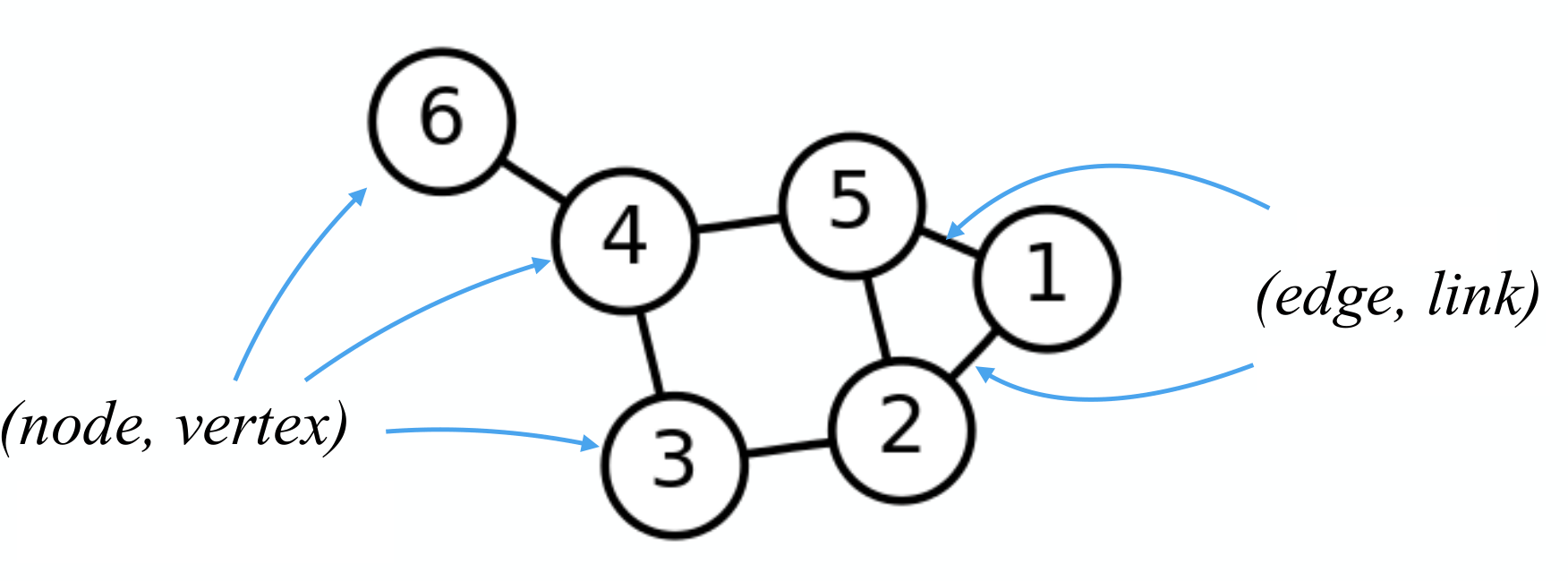
当然还包括其它的概念,比如
- adjacency matrix:
- edge list:
- Node list:
- Weighted network graph:
- Directed and undirected network graph:
有向图 !图片
无向图 !图片
网络分析
先介绍tidygraph宏包
tidygraph: A tidy API for graph manipulation
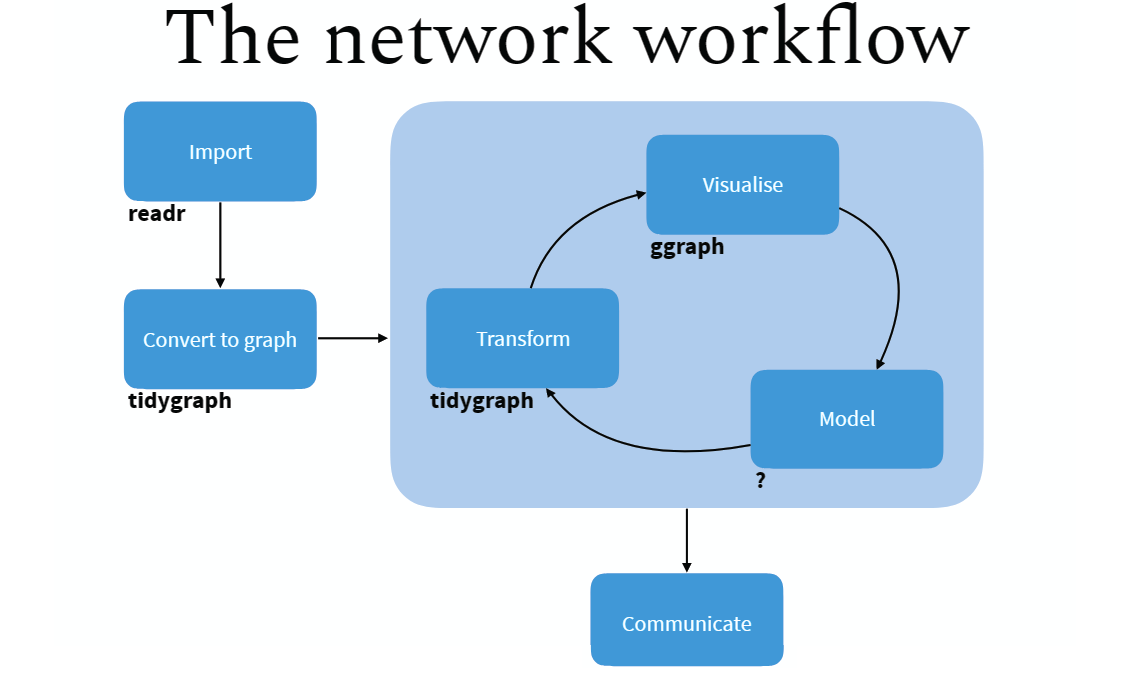
Tidy Network Anaylsis
- 在
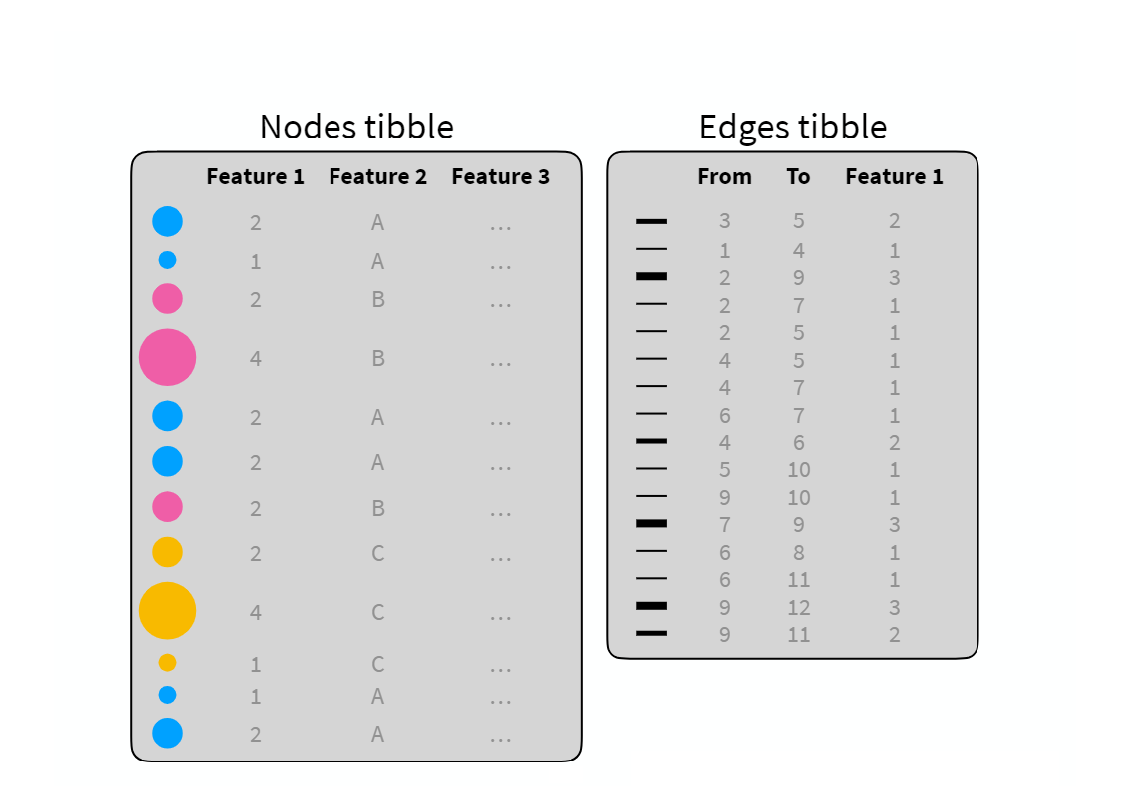
tidygraph框架, 网络数据可以分解成两个tidy数据框: - 一个是 node data
- 一个是 edge data
tidygraph宏包提供了node数据框和edge数据框相互切换的方案,并且可以使用dplyr的语法操控tidygraph提供了常用的网络结构的algorithms,比如,计算网络拓扑结构中节点的重要性、中心度等。
Create network objects
创建网络对象主要有两个函数:
tbl_graph(). Creates a network object from nodes and edges dataas_tbl_graph(). Converts network data and objects to atbl_graphnetwork.
案例: 欧盟总统之间通话以及次数。
library("navdata") # devtools::install_github("kassambara/navdata")
data("phone.call2")node_list <- phone.call2$nodes
node_listedge_list <- phone.call2$edges
edge_listUse tbl_graph
- Create a
tbl_graphnetwork object using the phone call data:
phone.net <- tbl_graph(nodes = node_list, edges = edge_list, directed = TRUE)- Visualize the network graph
ggraph(phone.net, layout = "graphopt") +
  geom_edge_link(width = 1, colour = "lightgray") +
  geom_node_point(size = 4, colour = "red") +
  geom_node_text(aes(label = label), repel = TRUE) +
  theme_graph()
Use as_tbl_graph
mtcars data set: R 的内置数据集,记录了32种不同品牌的轿车的的11个属性
1、we create a correlation matrix network graph
library(corrr)
res.cor <- datasets::mtcars[, c(1, 3:6)] %>% # (1)
t() %>%
corrr::correlate() %>% # (2)
corrr::shave(upper = TRUE) %>% # (3)
corrr::stretch(na.rm = TRUE) %>% # (4)
dplyr::filter(r >= 0.998) # (5)
res.cor2、Create the correlation network graph:
set.seed(1)
cor.graph <- as_tbl_graph(res.cor, directed = FALSE)ggraph(cor.graph) +
geom_edge_link() +
geom_node_point() +
geom_node_text(
aes(label = name),
size = 3, repel = TRUE
) +
theme_graph()Print out a network object
cor.graphextract the current active data
cor.graph %>%
  activate(edges) %>%
  arrange(desc(r))
Note that, to extract the current active data as a tibble, you can use the function as_tibble(cor.graph).
Network graph manipulation
Car groups info (Number of cylinders)
# Car groups info
cars.group <- tibble(
  name = rownames(datasets::mtcars),
  cyl = as.factor(datasets::mtcars$cyl)
)
cars.group
Modify the nodes data:
# Modify the nodes data
cor.graph <- cor.graph %>%
  activate(nodes) %>%
  left_join(cars.group, by = "name") %>%
  rename(label = name)
cor.graph
Modify the edge data.
# Modify the edge data.
cor.graph <- cor.graph %>%
  activate(edges) %>%
  rename(weight = r)
cor.graph
Display the final modified graphs object:
cor.graphVisualize the correlation network
set.seed(1)
ggraph(cor.graph) +
  geom_edge_link(aes(width = weight), alpha = 0.2) +
  scale_edge_width(range = c(0.2, 1)) +
  geom_node_point(aes(color = cyl), size = 2) +
  geom_node_text(aes(label = label), size = 3, repel = TRUE) +
  theme_graph()
Network analysis
Centrality
Centrality is an important concept when analyzing network graph.
The tidygraph package contains more than 10 centrality measures, prefixed with the term centrality_ :
# centrality_alpha()
# centrality_power()
# centrality_authority()
# centrality_betweenness()
# centrality_closeness()
# centrality_hub()
# centrality_degree()
# centrality_pagerank()
# centrality_eigen()
# centrality_subgraph
# centrality_edge_betweenness()
example:
- use the phone call network graph ( 欧盟总统之间通话以及次数)
- compute nodes centrality
set.seed(123)
phone.net %>%
  activate(nodes) %>%
mutate(centrality = centrality_authority())set.seed(123)
phone.net %>%
activate(nodes) %>%
mutate(centrality = centrality_authority()) %>%
ggraph(layout = "graphopt") +
geom_edge_link(width = 1, colour = "lightgray") +
geom_node_point(aes(size = centrality, colour = centrality)) +
geom_node_text(aes(label = label), repel = TRUE) +
scale_color_gradient(low = "yellow", high = "red") +
theme_graph()Clustering
- Clustering is a common operation in network analysis and it consists of grouping nodes based on the graph topology.
- Many clustering algorithms from are available in the tidygraph package and prefixed with the term group_. These include:
- Infomap community finding. It groups nodes by minimizing the expected description length of a random walker trajectory. R function:
group_infomap() - Community structure detection based on edge betweenness. It groups densely connected nodes. R function:
group_edge_betweenness()
example:
- use the correlation network graphs (记录了32种不同品牌的轿车的的11个属性)
- detect clusters or communities
set.seed(123)
cluster_mtcars <- cor.graph %>%
  activate(nodes) %>%
  mutate(community = as.factor(group_infomap()))
cluster_mtcarscluster_mtcars %>%
ggraph(layout = "graphopt") +
geom_edge_link(width = 1, colour = "lightgray") +
geom_node_point(aes(colour = community), size = 4) +
geom_node_text(aes(label = label), repel = TRUE) +
theme_graph()More Algorithms

小结
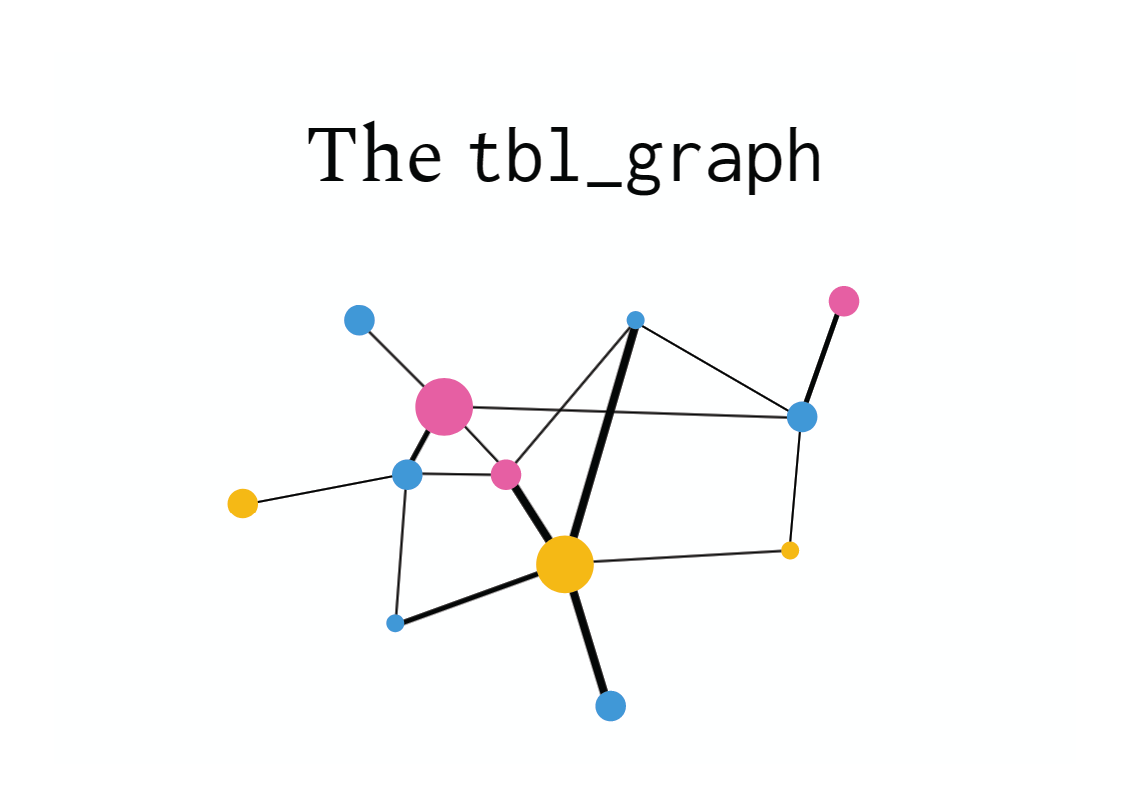
tidybayes很聪明地将复杂的网络结构用两个数据框表征出来,node 数据框负责节点的属性,edge 数据框负责网络连接的属性,调整其中的一个数据框,另一个也会相应的调整,比如node数据框中删除一个节点,edge数据框就会自动地删除该节点的所有连接。
Network Visualization
这里主要介绍tidygraph配套的ggraph宏包,它们的作者都是同一个人。
ggraph: A grammar of graphics for relational data
ggraph 沿袭了ggplot2的语法规则,
cluster_mtcars %>%
  # Layout
  ggraph(layout = "graphopt") +
  # Edges
  geom_edge_link(
    width = 1,
    colour = "lightgray"
  ) +
  # Nodes
  geom_node_point(
    aes(colour = community),
    size = 4
  ) +
  geom_node_text(
    aes(label = label),
    repel = TRUE
  ) +
  theme_graph()
扩展阅读
- <https://www.data-imaginist.com/2017/introducing-tidygraph/>
- <https://github.com/thomasp85/tidygraph>
- <https://christophergandrud.github.io/networkD3/>
# remove the objects
# rm(list=ls())
#rm(cars.group, cluster_mtcars, cor.graph, edge_list, node_list, phone.call2, phone.net, res.cor)pacman::p_unload(pacman::p_loaded(), character.only = TRUE)